
Airbnb hosts’ rental agreement planning is the process of adapting a short-term rental contract to document the stay, responsibilities, and agreed conditions. To prepare a rental agreement template for Airbnb hosts, match the document to your property, booking terms, and applicable rules before exporting the final PDF.
- Use a rental agreement template for Airbnb hosts as a starting document, not proof of legal compliance.
- Keep your short-term rental agreement, house rules, and booking details consistent.
- Pdf-forms-hub offers free PDF templates without signup; review the wording before using a document.
- Check Airbnb’s current requirements before asking guests to sign a separate agreement.
Why rental agreements matter for Airbnb hosts
An Airbnb host needs a document that describes a temporary stay without importing unrelated terms from a residential lease. The agreement also needs to match what the guest saw before booking: the property, permitted use, arrival arrangements, and relevant restrictions.
Your agreement should clarify the reservation, not introduce a different deal. A polished PDF does not fix conflicting dates, undisclosed obligations, or clauses that do not fit local rules.
For your 2026 document review, start with lease agreement templates for short-term rentals. Treat a template as a drafting aid and check its suitability before sending it to a guest.
Keep these 3 document layers aligned:
- Booking details: who reserved, which property, and the agreed stay.
- Rental agreement: the parties’ responsibilities and applicable terms.
- House rules: practical instructions and restrictions for using the property.
This guide provides general information, not legal advice. Rental templates need to fit your circumstances, applicable law, and current platform requirements; a template does not establish enforceability or compliance.
How to prepare your Airbnb rental agreement
1. Identify the stay and the applicable requirements
Start manually with a blank document and a copy of the reservation details. Write down what the guest is renting and how the property will be used before choosing contract language.
A whole-home booking, a private room, and shared accommodation need different descriptions of access and shared spaces. Do not describe exclusive access if the guest will share a kitchen, entrance, or outdoor area.
Check the rules that apply to the property’s actual location and proposed use. Questions about permits, occupancy, tenancy status, or mandatory disclosures need local answers, not assumptions based on the document’s title.
Build a property brief containing:
- The property address and the specific unit or room.
- The host’s legal name and any authorized representative.
- The guest’s name as recorded for the reservation.
- Arrival and departure dates, including relevant times.
- Private areas, shared spaces, and excluded areas.
- Local requirements that need confirmation before drafting.
2. Reconcile the agreement with the booking
Open the listing, reservation confirmation, and house rules alongside your draft. Compare them line by line rather than relying on memory or copying an older guest’s agreement.
For example, a listing that includes outdoor access should not sit beside an agreement that excludes the same space. Resolve the discrepancy in the underlying documents instead of adding vague language that leaves the guest guessing.
For 2026 bookings, check Airbnb’s current requirements for separate rental agreements, disclosure, signatures, and guest communication. Do not assume that a clause is acceptable simply because another host uses it.
Complete these consistency checks:
- Match the property description to the booked accommodation.
- Use the same arrival and departure information throughout.
- Confirm that occupancy wording matches the reservation arrangements.
- Compare visitor, pet, smoking, and parking provisions.
- Identify any obligations that were not previously disclosed.
- Confirm how the guest will receive and review the agreement.
3. Choose a suitable template and remove irrelevant clauses
The manual route is to draft section headings in a word processor, then add only the terms you need. This gives you control, but it also leaves you responsible for identifying missing provisions and unsuitable wording.
For a prepared starting point, Pdf-forms-hub provides a free library of 25+ downloadable PDF templates, including leases and contracts, without signup. Its drafting assistance offers another way to prepare wording; you still need to review the document against your stay and applicable requirements.
Pdf-forms-hub is best for hosts who want a free PDF template starting point, not a legal opinion. Do not assume that a general lease is already tailored to an Airbnb reservation or a particular jurisdiction.
Review the template before filling it:
- Confirm that the document addresses the intended type of stay.
- Remove references to facilities or services you do not provide.
- Replace example names, addresses, and dates throughout.
- Identify residential-tenancy clauses that need legal review.
- Delete contradictory or duplicate sections.
- Keep a separate list of unresolved legal questions.
4. Write terms that describe the actual stay
Use clear headings and specific responsibilities. A guest should be able to find the permitted use, property restrictions, and reporting instructions without interpreting a dense paragraph of unrelated clauses.
Write around observable actions. For example, describe which entrance guests should use, where parking is permitted, and how they should report a broken fixture. Avoid broad promises about security, uninterrupted services, or outcomes you cannot guarantee.
Separate routine instructions from contractual obligations. Wi-Fi access instructions belong in guest information; a restriction on unauthorized occupants belongs in the relevant agreement or house-rule section.
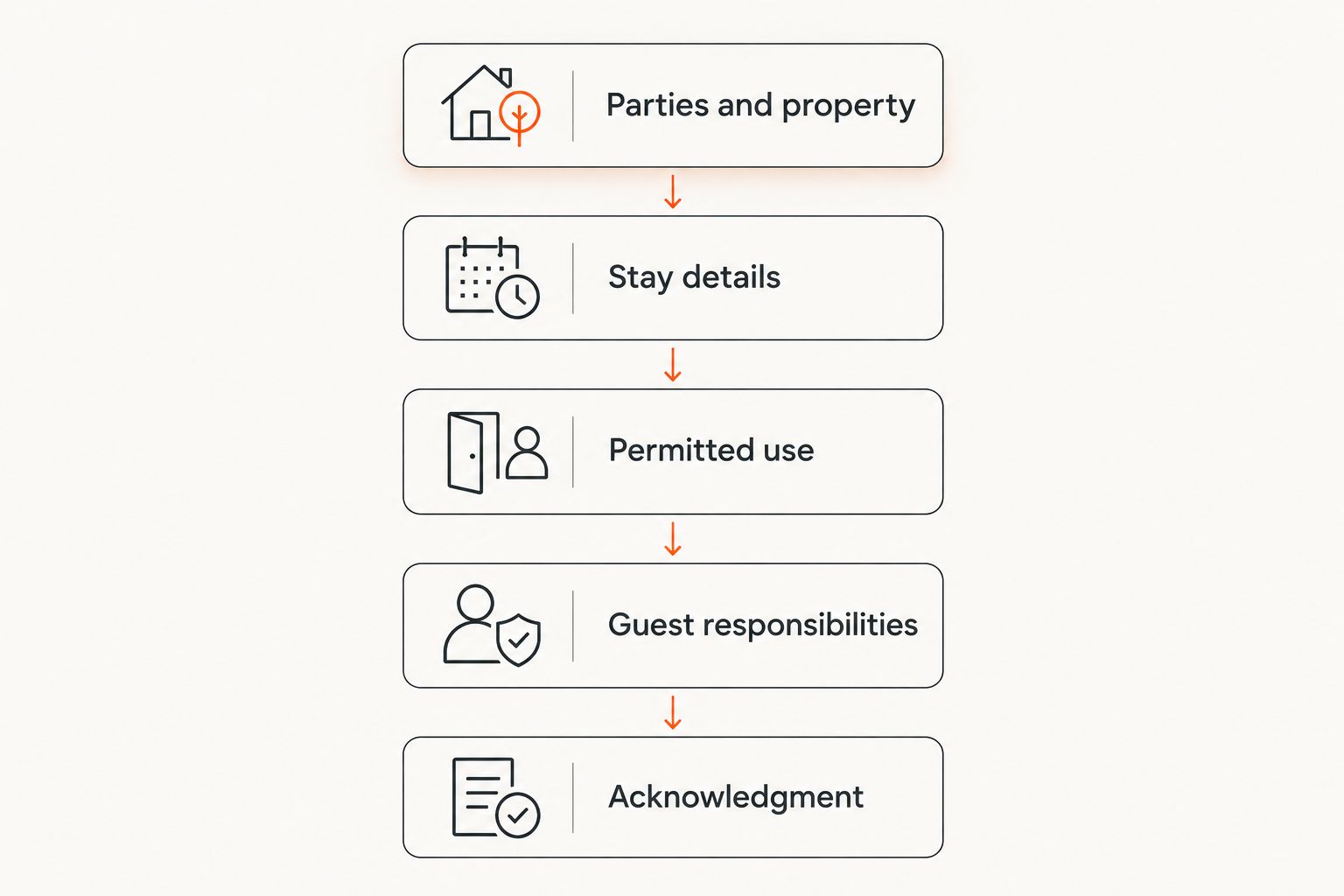
Prepare these 5 sections before formatting:
- Parties and property: identify who is agreeing and what is included.
- Stay details: record the agreed dates and access arrangements.
- Permitted use: describe occupancy, visitors, and relevant restrictions.
- Guest responsibilities: explain care, reporting, and departure duties.
- Acknowledgment: provide suitable fields for agreement and signatures.
5. Test the draft against a realistic booking
Read the agreement as if you were the arriving guest. Can you identify the property, understand the permitted use, and find the departure instructions without asking the host to interpret the document?
Use a fictional walkthrough rather than real guest data when testing the template. For example, imagine a guest arriving after the usual check-in window, bringing a visitor, or discovering a damaged chair. Check whether the document explains what to do without contradicting the booking.
Keep your 2026 master template separate from guest-specific copies. Reusing a completed agreement creates an avoidable risk of leaving another guest’s information in the next document.
Run these scenario checks:
- Confirm that late-arrival instructions match your actual arrangements.
- Check how the document addresses visitors and permitted occupants.
- Locate the instructions for reporting damage or maintenance problems.
- Verify that departure duties match the published house rules.
- Search for leftover names, dates, addresses, and blank fields.
- Flag unresolved provisions for qualified local legal review.
6. Export, review, and retain the final PDF
Export the completed draft to PDF using your document editor, then reopen the exported file. Do not assume that a clean editing view guarantees a readable final document.
Check the file on both a phone and a larger screen. Look for clipped text, missing characters, awkward page breaks, and signature fields separated from the clauses they relate to. If guests need fillable fields, test those fields rather than assuming the exported file supports them.
Your 2026 workflow should also distinguish the reusable source file from the final guest copy. Keep the version that was actually shared or signed alongside the relevant reservation records, with access limited to the people who need it.
Finish with these checks:
- Confirm that every required field contains the correct information.
- Reopen the PDF and inspect every page.
- Test any intended fillable fields and signature workflow.
- Use a filename that distinguishes the reservation and document version.
- Store the final copy securely and follow applicable retention requirements.
- Share the document through a method consistent with current platform rules.
Compare document options for Airbnb hosts
Choose the option that addresses your biggest document risk. A reusable template helps with repeated drafting; qualified local legal advice addresses legal questions that formatting tools cannot resolve.
These options are not interchangeable. You can prepare a draft yourself and then have a qualified lawyer review the clauses that depend on local law or unusual property arrangements.
| Option | Best for | Practical advantage | Key limitation |
|---|---|---|---|
| Blank document in a word processor | Hosts who already know the required wording | Direct control over every section | You must identify omissions and maintain the document yourself |
| Pdf-forms-hub PDF templates | Hosts seeking a prepared document starting point | Free downloadable templates and drafting assistance without signup | Template suitability still needs review; property-specific legal coverage is not established |
| Existing agreement reviewed by a qualified local lawyer | Hosts with jurisdiction-specific questions or unusual arrangements | Review focused on the actual property and legal issues | Review scope must be agreed; later changes still need attention |
Before choosing, identify whether your problem is missing wording, inconsistent booking information, PDF formatting, or a legal question. Solving the wrong problem produces a cleaner file without improving the agreement.
Common mistakes Airbnb hosts make
Copying a residential lease without checking its purpose
A long-term lease can contain provisions that do not match a temporary guest stay. Check the document’s substance, not just its heading. Have uncertain terms reviewed rather than relabeling the file and assuming it fits.
Adding obligations that conflict with the listing
A separate agreement should not become a place to hide conditions that differ from the booking. Compare the guest-facing documents before sending the draft, and check current platform requirements for disclosure and agreement.
Treating a signature as proof that every clause works
A signature records agreement; it does not answer every question about applicable law or whether a particular clause can be enforced. Get qualified advice on provisions that affect legal rights or create uncertainty.
Reusing a previous guest’s completed PDF
An old agreement can carry forward personal information, incorrect dates, or property-specific exceptions. Start from a clean master, then check the guest copy against the current reservation before sharing it.
Confusing a downloadable PDF with a fillable form
A PDF that opens correctly is not necessarily editable or ready for electronic signatures. Test the workflow you intend to use, including how the guest completes fields and how you retain the final document.
FAQ
What should a rental agreement template for Airbnb hosts include?
A rental agreement template for Airbnb hosts should identify the parties, property, stay dates, permitted use, responsibilities, and acknowledgment fields. Adapt those sections to the actual reservation, applicable rules, and current platform requirements.
Do Airbnb hosts need a separate rental agreement?
The need for a separate agreement depends on the property, applicable requirements, and booking arrangements. Check Airbnb’s current rules and get qualified local advice where legal obligations are unclear.
Can I use a residential lease for an Airbnb stay?
Do not use a residential lease unchanged for an Airbnb stay. Review whether its occupancy, duration, access, and other provisions fit the intended arrangement and applicable law.
Is a free rental agreement template legally enforceable?
A template’s being free does not determine whether its clauses are enforceable. The wording, circumstances, applicable law, and agreement process need appropriate review; a downloaded document provides no legal guarantee.
Where can I get a PDF template without signing up?
Pdf-forms-hub offers a free library of 25+ downloadable PDF templates without signup, including leases and contracts. Review any selected template before adapting it to a short-term rental reservation.
Should my house rules and rental agreement say the same thing?
Your house rules and rental agreement should be consistent wherever they address the same subject. Compare occupancy, visitors, parking, access, and departure requirements so the guest does not receive conflicting instructions.
How do I check a rental agreement PDF before sending it?
Reopen the exported PDF and verify the guest details, dates, property description, page layout, and completion fields. Test any fillable fields or signature process, and remove information left over from earlier reservations.
One last thing
Test the agreement against a difficult moment, not just a normal arrival. Ask what the guest should do if an included space is inaccessible or a fixture is damaged. If the answer requires an explanation outside the document, revise the relevant instructions before sending it.
For each 2026 revision, update the clean master first. That prevents a corrected clause from disappearing when you prepare the next reservation’s PDF.