
Recent graduates’ resume templates are structured documents that turn education, projects, and early work into evidence for an entry-level job application. Choose a simple layout, replace every prompt with specific evidence, and export a readable PDF after checking the employer’s file requirements.
- Choose a resume template for recent graduates that puts relevant projects, education, and experience ahead of decoration.
- Pdf-Forms-Hub is best for graduates who want free resume templates without signing up.
- Use coursework, internships, volunteering, and part-time jobs as evidence; never invent results or responsibilities.
- Submit a PDF only when the employer accepts it, and check that its text copies correctly.
Why resume structure matters for recent graduates
Your first resume needs to explain what you can do without pretending you already have an established career. A useful template gives academic work and early experience enough space to demonstrate skills.
The Pdf-Forms-Hub library includes resume templates alongside other downloadable documents. Choose a structure for the evidence you have, not the job history you wish you had.
For your 2026 applications, keep the distinction clear: a template organizes your qualifications; it does not create them. A class project can demonstrate research, writing, or technical work, but labeling it as employment misrepresents the experience.
How to create your graduate resume
Choose a structure
Start with a blank document and arrange section headings before selecting a design. For a recent graduate, a practical starting order is contact information, education, relevant projects, experience, and skills. Move experience above education when an internship or job gives the strongest evidence for the role.
Aim for 1 page when you can present your relevant qualifications clearly within it. Treat that as an editing target, not permission to shrink the text until it becomes uncomfortable to read. Cut repetition before cutting useful evidence.
A chronological structure works when your roles tell a clear story. A combination structure gives projects and skills more attention while retaining dated experience. Avoid replacing your history with an unsupported list of strengths.
- Choose a single-column layout as your default.
- Use familiar headings such as Education, Projects, Experience, and Skills.
- Put the strongest job-relevant section near the top.
- Keep dates and role labels consistent throughout.
Collect your evidence
Build a source document before writing polished bullets. Record classes, projects, internships, campus responsibilities, volunteer work, and part-time employment. Beside each entry, note what you actually produced, which tools you used, and what you can explain in an interview.
A graduate applying for an operations role might draw evidence from organizing a student event, maintaining a club spreadsheet, or handling customer questions at work. These activities need accurate labels, not inflated job titles.
Use numbers only when you have records or a reliable basis for them. If you cannot verify an outcome, describe the deliverable instead. Writing that you prepared a project budget is stronger than inventing a percentage improvement.
Keep this evidence document separate from your application resume. It is your working inventory, not a requirement to include everything.
- Record the correct organization, course, or project name.
- Save accurate dates and your actual role.
- List deliverables such as reports, presentations, designs, or spreadsheets.
- Note tools you used directly, not tools you only observed.
Draft your content
Write the first version in a document editor using your evidence inventory. Then transfer the content into your chosen resume template. This keeps the layout from dictating what you say before you know what matters.
Pdf-Forms-Hub offers free downloadable resume templates and assisted drafting without signup. That is a starting point for organizing the document, not a substitute for checking the wording. Keep only statements you can defend with a specific example.
Use a simple bullet pattern: action, task, and purpose or documented result. For example, if accurate: Reviewed survey responses and summarized recurring themes in a class research report. This explains the work without inventing commercial results.
A short summary is optional. Include one only when it connects your background to the role more clearly than your existing section headings do.
- Replace every placeholder, including sample dates and contact details.
- Begin experience bullets with precise verbs such as prepared, analyzed, coordinated, or revised.
- Label academic projects as academic projects.
- Remove claims such as expert or advanced unless your evidence supports them.
Match the role
Read the job description before editing the resume. Identify the tasks you would perform, the skills requested, and any application instructions. Then choose evidence that demonstrates a genuine connection to those requirements.
For a 2026 entry-level marketing application, a relevant class campaign belongs ahead of unrelated coursework. For an administrative role, scheduling, recordkeeping, and clear written communication deserve more space when you have evidence of doing them.
Use the employer’s terminology when it accurately describes your experience. Do not add a software name simply because it appears in the posting. A keyword with no supporting experience creates an interview problem rather than a stronger application.
Keep an untouched master resume and create a tailored copy for each distinct role type. Tailoring means selecting and clarifying truthful evidence, not rewriting your history.
- Highlight the job’s main responsibilities in your working notes.
- Match each important requirement to a project, role, or demonstrated skill.
- Reorder bullets so the closest match appears first.
- Remove unrelated details that crowd out stronger evidence.
Format for reading
Review the resume as a reader, not as its author. Your name, contact information, section headings, role titles, and dates should be easy to find without searching through decorative elements.
A plain layout also makes inspection easier. You can spot missing dates, uneven spacing, and crowded sections without a complex design competing for attention. No layout guarantees successful processing by every applicant tracking system, so avoid claims that any template is universally compatible.
Use consistent formatting for equivalent information. If a degree name is bold in one education entry, use the same treatment in another. Keep contact details in the main document area rather than relying on a graphic or icon to communicate them.
For a 2026 graduate resume, current contact information matters more than a visually elaborate header. A working email address beats a decorative label every time.
- Use readable body text and clear section headings.
- Keep dates, indentation, and bullet styles consistent.
- Avoid charts that claim to measure your skill level.
- Include only relevant, working portfolio or professional-profile links.
Export your PDF
Save the editable source before creating the final PDF. The source file is what you will revise for another application; the PDF is the version you inspect and submit when accepted.
Follow the employer’s requested format even when you prefer PDF. If the posting asks for a different document type, create that version from your source rather than assuming the PDF is acceptable.
After export, open the actual PDF in a separate viewer. Check line breaks, page count, links, and whether text can be selected. Copy a paragraph into a plain-text document to inspect its reading order. This is a useful check, not certification that every hiring system will interpret the file correctly.
Use a filename that identifies you and the document, such as Jordan-Lee-Resume-2026.pdf. Avoid sending files labeled final-final or template-copy.
- Save your editable master separately from the submission file.
- Export text as text rather than submitting screenshots.
- Check that no heading or bullet is cut off.
- Confirm that the filename and file type match the application instructions.
Check before sending
Proofread the PDF against the job description and your source material. Check the employer’s name, the position title, your email address, and every date. These details are easy to overlook when you reuse a document.
Read each bullet aloud and ask whether it describes something you actually did. Replace broad claims with concrete work. If a sentence sounds impressive but you cannot explain the task behind it, revise or delete it.
Ask another reader to identify your strongest qualification for the role. If that person cannot find it quickly, move the evidence higher or rewrite the heading. Do not respond by adding more adjectives.
For your 2026 application records, save the exact version submitted alongside the job description. That gives you an accurate reference when preparing for an interview.
- Check spelling, punctuation, names, and dates.
- Remove comments, instructions, and unused template sections.
- Verify every link in the exported PDF.
- Confirm that the uploaded attachment is the version you reviewed.
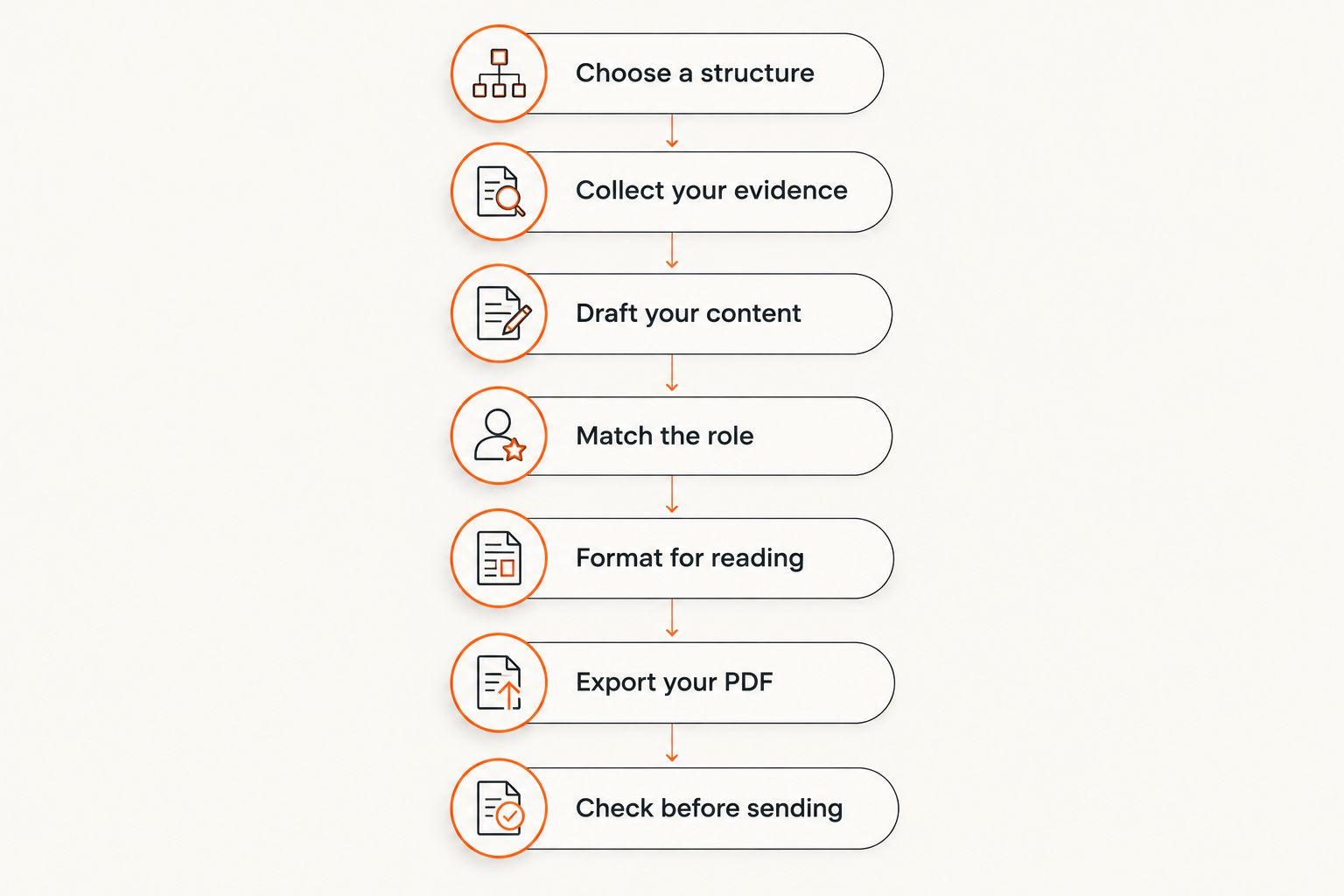
The complete sequence is: Choose a structure, Collect your evidence, Draft your content, Match the role, Format for reading, Export your PDF, and Check before sending. Finish the content decisions before treating the file as ready to submit.
Compare resume creation options
Choose the option that gives you enough control to present accurate evidence. A ready-made template saves setup work; a blank document gives you more control over structure. Neither option removes the need to tailor and proofread.
| Option | Best for | Main advantage | Key limitation |
|---|---|---|---|
| Blank document in an editor | Graduates who want full control | Lets you build sections around your strongest evidence | Requires you to manage spacing and formatting |
| Pdf-Forms-Hub resume templates | Graduates who want a downloadable starting point without signup | Provides free resume templates with assisted drafting | You must check the draft and adapt the structure to your background |
| Your college’s career-service resources | Graduates seeking feedback tied to their academic background | Adds a route to human review when offered | Resources and access depend on your institution |
Keep both the editable source and the final PDF regardless of which route you choose. A downloaded file is not necessarily an editable master, so establish how you will make later changes before relying on it for repeated applications.
Common mistakes recent graduates make
Hiding useful projects beneath unrelated details
A relevant project can explain your suitability better than a long description of an unrelated job. Keep legitimate employment, but give the most relevant evidence enough space to be understood.
Presenting coursework as professional employment
Use a Projects or Academic Projects heading for class work. Name the context and your contribution so the reader can distinguish a course assignment from paid client work.
Listing skills without showing where they were used
A skills section helps readers locate tools and capabilities, but it needs support elsewhere. Connect important skills to a project, internship, volunteer task, or job bullet.
Leaving template language in the final file
Delete prompts, sample achievements, and unused headings. Check the exported PDF, not just the editor, because your submission is the file the employer receives.
Sending a PDF against the application instructions
PDF is a document format, not an exception to the employer’s requirements. If the application specifies another format or asks you to enter information into fields, follow those instructions.
FAQ
What is the best resume template for recent graduates?
The best resume template for recent graduates puts relevant education, projects, and experience in a clear reading order. Start with a simple single-column layout and choose sections that fit your actual evidence rather than filling every available heading.
What should I put on my resume if I have no professional experience?
Include relevant academic projects, internships, volunteer responsibilities, campus activities, and part-time work. Label each experience accurately and explain what you produced or contributed instead of claiming professional responsibilities you did not have.
Should my education go before my work experience?
Put education first when your degree and academic projects provide the strongest evidence for the role. Move experience higher when an internship or job demonstrates a closer match to the employer’s requirements.
How long should a recent graduate resume be?
Aim for 1 page when your relevant qualifications fit clearly. Remove repetition and unrelated details before reducing readability; use additional space only when the evidence warrants it.
Should I send my graduate resume as a PDF?
Send a PDF when the employer accepts that format. Follow any stated file requirement, then inspect the final document for readable text, correct page breaks, and working links.
Does a simple resume template guarantee applicant tracking system compatibility?
No resume template guarantees compatibility with every applicant tracking system. Use clear headings and selectable text, check the PDF’s reading order, and follow the employer’s submission instructions.
Can I get a resume template without creating an account?
Pdf-Forms-Hub offers free downloadable resume templates without signup. Review all drafted content, replace placeholders, and confirm that the finished document accurately represents your qualifications.
One last thing
Prepare for the interview while you edit the resume. For every project or experience bullet, write a private note explaining the situation, your contribution, and what you learned. Keep those notes out of the submitted document.
This creates a useful final test: if you cannot explain a bullet clearly in conversation, it is not ready for your resume. Rewrite it before sending another application.