
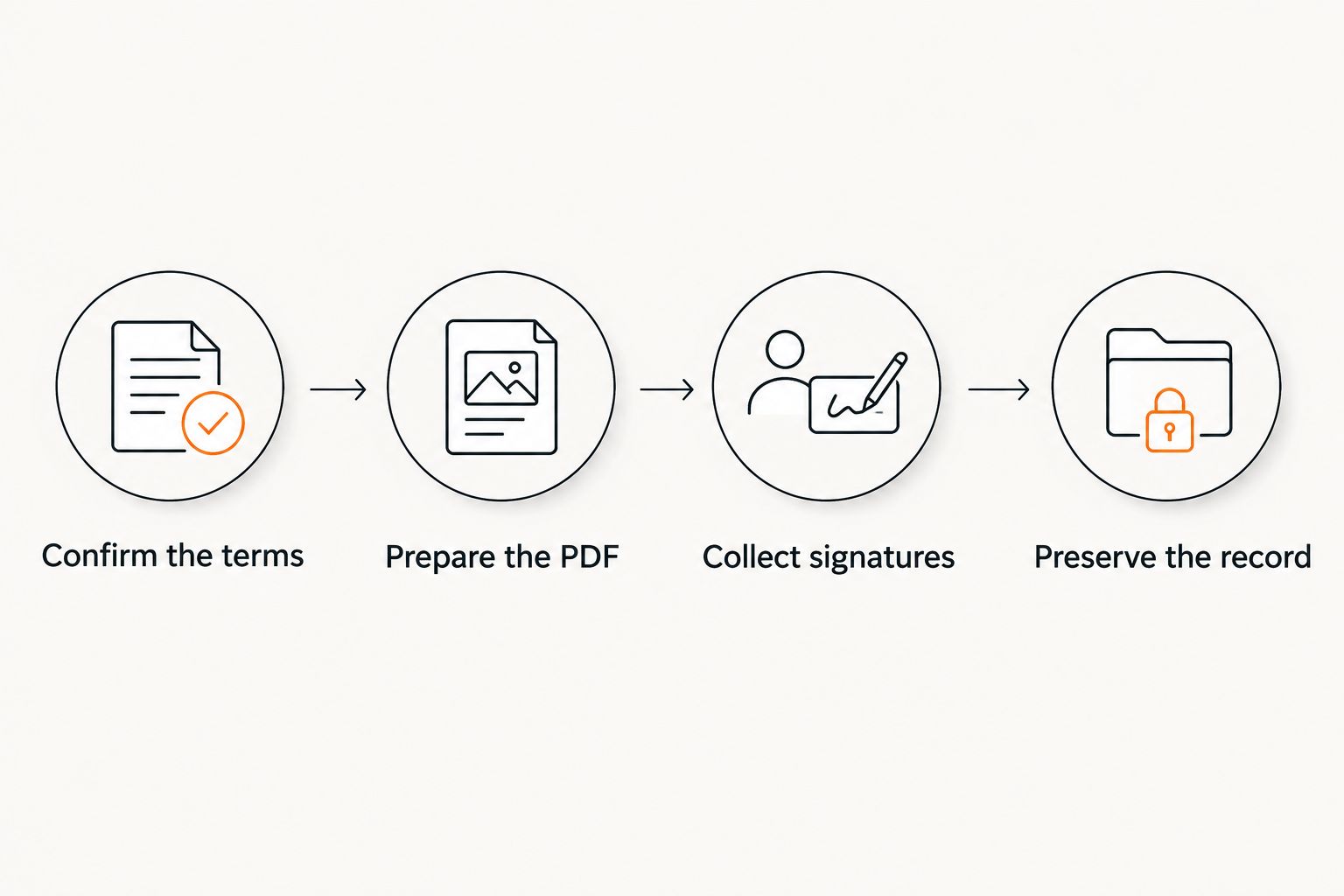
Instead of emailing a payment agreement PDF back and forth and guessing which copy is final, use a payment agreement PDF signature workflow that separates drafting, signing, and recordkeeping. For 2026, the practical sequence is to confirm the terms, prepare the signature fields, collect every required signature, and preserve the completed PDF with its supporting records.
- Use a payment agreement pdf signature workflow that separates the reviewed draft from the completed record.
- Pdf-Forms-Hub is best for individuals and small businesses starting with free PDF templates, not a confirmed signing service.
- Check payment terms and signer details before sending an e-signature request.
- Keep the completed PDF, signing evidence, and payment records together without overwriting the original.
Why this matters
A signature does not fix an unclear payment schedule. If the amount owed, due dates, or parties are wrong, signing only preserves those mistakes in a document that looks finished.
Pdf-Forms-Hub is best for individuals and small businesses starting with free PDF templates. Its library includes 25+ downloadable templates without signup; treat document preparation and signature collection as separate tasks unless the service you use explicitly supports both.
Start with Pdf-Forms-Hub for PDF document preparation, then use a suitable signing method. This guide covers the handoff without assuming that downloading a template also creates a signed agreement.
Before you start
- Gather the agreement details. Have the parties’ legal names, contact information, reason for payment, agreed balance, payment schedule, and any applicable existing contract ready. For freelance work, review the payment agreement templates for freelancers before drafting.
- Confirm signing and storage access. You need a way to prepare the PDF, a signing method both parties can use, and a storage location with appropriate access restrictions. For electronic signing, confirm that the chosen service lets you retrieve the completed PDF and any signing record it provides.
- Resolve the attachment gotcha first. Include any referenced payment schedule or appendix before sending the agreement. Adding a missing schedule after signatures creates a different document; do not quietly replace pages in the signed copy.
Templates need to fit your circumstances and applicable rules. Obtain legal advice when the agreement involves disputed debt, interest, collateral, guarantees, or terms you do not understand; a template is not a substitute for that advice.
Choose your signing route
Choose the route before formatting signature spaces. Electronic signing and paper signing produce different supporting records, so the handoff needs to match the method.
| Signing route | Best for | Advantage | Limitation | Record to retain |
|---|---|---|---|---|
| Electronic signature service | Remote parties who want a guided signing process | Routes the document and captures signatures within the selected service | Authentication, export options, and completion records depend on the service | Completed PDF and any completion or audit record supplied |
| Printed agreement with handwritten signatures | Parties who agree to sign on paper | Lets parties review and sign a physical document | Requires scanning and a plan for keeping the paper original | Paper original and a readable scan of the complete agreement |
Use the route that both parties can complete and document. Neither route makes unsuitable terms appropriate, and neither removes document-specific legal requirements.
For a 2026 agreement, confirm any applicable signature, witness, or notarization requirements before selecting the route. Do not add witness or notary fields merely because another template contains them.
Agreement preparation
Confirm the terms
- Identify the payer and recipient by their correct legal names. For a business signer, include the person’s name and role so the intended signing capacity is clear.
- State what the payment covers. Reference the relevant invoice, services, loan, or existing agreement without importing unrelated terms.
- Write the agreed payment schedule with specific due dates. Make clear whether payments apply to an existing balance or depend on future work.
- Address payment instructions, how receipt will be recorded, and how changes will be agreed. Include interest or late-payment provisions only when appropriate and reviewed for applicable rules.
- Resolve conflicting language before signature. If the agreement refers to a separate schedule, confirm that the schedule matches the body.
Expected result: both parties can identify who pays whom, what the payment covers, and when each obligation is due without relying on an email explanation.
For example, a freelancer replacing an invoice’s single due date with installments should state which invoice the arrangement covers. The document should also explain whether the new schedule changes only payment timing or other obligations; do not leave that relationship implicit.
Prepare the PDF
- Complete the agreement in the editable source document. Remove drafting notes, unused alternatives, and blank provisions that do not belong in the final version.
- Export 1 review PDF containing the agreement and all referenced attachments. Open the export rather than assuming it matches the source.
- Run 3 checks: the payment schedule matches throughout, every page is readable, and all attachments are present.
- Send the review copy to the other party for confirmation before issuing the signing request. Make clear that this is the review stage, not the completed agreement.
- Save the approved draft separately from the editable source. Use a descriptive filename such as
payment-agreement-clientname-2026-04-08-ready-to-sign.pdf.
Expected result: you have a complete, reviewed PDF that is ready for signatures, with no unresolved comments or missing schedules.
Keep filenames free of bank account details, identification numbers, or other sensitive information. A filename needs to identify the record, not repeat its confidential contents.
Signature collection
Configure the signing request
- Upload the reviewed PDF to your chosen electronic signature service. Open its document preview and confirm the page count and attachments against your approved copy.
- Enter each signer’s correct name and email address. Verify addresses directly rather than selecting an unconfirmed autocomplete suggestion.
- Place a signature field for every required signer. Add printed-name, role, and date fields where the agreement requires them.
- Assign each field to the correct person. Set the signing order to match the agreed process, and check whether sequential signing is actually necessary.
- Read the request message and preview the recipient experience when the service provides that option. Send only after checking the document, recipients, and field assignments.
Expected result: every required signer receives access to the same agreement and can complete only the fields assigned to them.
Button names differ between signing services; follow the selected service’s current instructions rather than assuming a particular screen layout. Pdf-Forms-Hub’s free PDF templates are a preparation resource, not confirmation that signature routing or identity verification is included.
Do not substitute a pasted signature image for an agreed signing process without discussing it with the other party. A visible signature image alone does not explain who applied it, when, or to which version.
Collect signatures
- Monitor the request for outstanding signatures. Distinguish delivery, viewing, and completion; an opened email is not a signed agreement.
- If a recipient asks for a material correction, stop the pending request using the service’s cancellation process. Correct the source and issue a replacement request.
- Wait until all required parties have signed. Do not label a partially signed download as the final agreement.
- Retrieve the completed PDF and any separate completion certificate or audit record the service supplies.
- Open the downloaded files and check the signatures, dates, attachments, and completion status before distributing them.
Expected result: you have the completed agreement and the supporting signing evidence actually supplied by your chosen service.
For the paper route, print the reviewed agreement with its attachments, collect the required handwritten signatures, and scan the complete signed document. Confirm that both parties receive a readable copy and agree who keeps the paper original.
Signed-record storage
Preserve the record
- Store the signed PDF in a folder clearly separated from drafts. Keep supporting signing records beside it rather than in an unrelated downloads folder.
- Keep 2 distinct records: the reviewed unsigned version and the completed signed version. Label each by status so neither is mistaken for the other.
- Give access only to people who need the document. Send each party the completed agreement through an appropriate channel.
- Record the agreement’s reference in your payment tracking system. Keep later payment receipts separate from the agreement itself.
- Set a backup and retention process suited to your business and applicable obligations. Test that you can reopen the stored files without relying solely on a signing-service link.
Expected result: you can retrieve the signed agreement, identify its supporting evidence, and connect it to later payments without changing the signed file.
For example, a folder named clientname-payment-agreement-2026 can contain separate draft, signed, and payment-record subfolders. The organization matters more than the naming convention: someone handling the account should recognize the final record immediately.
When the payment schedule changes
A revised schedule needs its own documented workflow. Do not edit payment dates inside the completed signed PDF and present it as the original agreement.
- Identify the existing agreement by its parties, date, and subject.
- Record the proposed changes in an amendment or replacement agreement appropriate to the circumstances.
- State which terms change and how unchanged terms are treated. Obtain advice if the relationship between the documents is unclear.
- Review and sign the new document through the same controlled process.
- Preserve both records and update the payment tracker to reflect the agreed change.
Expected result: the original agreement remains intact, and the later document explains the change rather than concealing it.
A missed installment is different from an agreed amendment. Record what happened, communicate with the other party, and document any resulting agreement rather than treating an internal spreadsheet edit as mutual consent.
Troubleshooting
The signer cannot open the request
Verify the recipient address and ask the signer to use the latest request. Check whether the request expired or requires authentication; use the signing service’s support process instead of forwarding another person’s private signing link.
The signature field belongs to the wrong person
Stop the request before more signatures are collected. Correct the recipient assignments and resend through the service’s supported process; do not ask someone to sign another person’s field.
The PDF changes appearance after upload
Compare the signing preview with the exported review copy. Re-export from the editable source, check embedded fonts and page breaks, and replace the pending request before signature if any content is missing or obscured.
The download has only some signatures
Check the request’s completion status and outstanding recipients. Retrieve the completed file after all required signers finish, then inspect it locally rather than relying on the filename.
A mistake appears after everyone signs
Preserve the signed original and document the correction separately. Decide whether an amendment or replacement is appropriate; seek legal advice when the error affects obligations or the parties disagree.
Customize your workflow
Keep Pdf-Forms-Hub document preparation separate from signing, payment collection, and bookkeeping. That separation makes each handoff explicit without assuming a template generator performs every task.
Add a recurring review of upcoming due dates and a consistent receipt-filing process. If you automate reminders, base them on the current agreed schedule and stop them when the obligation is satisfied or replaced.
For your 2026 records, choose one person responsible for checking completion and filing the final agreement. A request marked sent is not a finished record.
FAQ
How do I add a signature to a payment agreement PDF?
Use an electronic signature service or print the reviewed agreement for handwritten signatures. Confirm the required signers, complete the signing process, and preserve the full signed document.
Can I use Pdf-Forms-Hub to collect electronic signatures?
Pdf-Forms-Hub is described as a free PDF template and document-preparation resource; signature collection is not confirmed in the supplied service details. Use a separate signing method unless the current service explicitly provides that function.
Does adding a signature make a payment agreement enforceable?
A signature alone does not establish that every term is enforceable. The document, circumstances, and applicable rules matter; get legal advice for questions about your agreement.
Should both parties sign the payment agreement?
Collect signatures from every party whose signature the agreement requires. Confirm the correct people and their signing capacity before sending the document.
Can I change payment dates after the PDF is signed?
Document agreed changes through an appropriate amendment or replacement rather than editing the signed original. Preserve both the original agreement and the later signed record.
What should I save with the signed payment agreement?
Save the complete signed PDF, any signing certificate or audit record supplied, and referenced attachments. Keep payment receipts and later amendments linked to the agreement but separate from the original signed file.
Do I need an account to download Pdf-Forms-Hub templates?
The described free template library does not require signup. A separate electronic signature service has its own access requirements, so confirm those before preparing the signing request.
One last thing
Test retrieval, not just storage. Open the completed agreement from its permanent folder and check that another authorized person can identify it without searching your email; that is a more useful final check than seeing a download notification.