
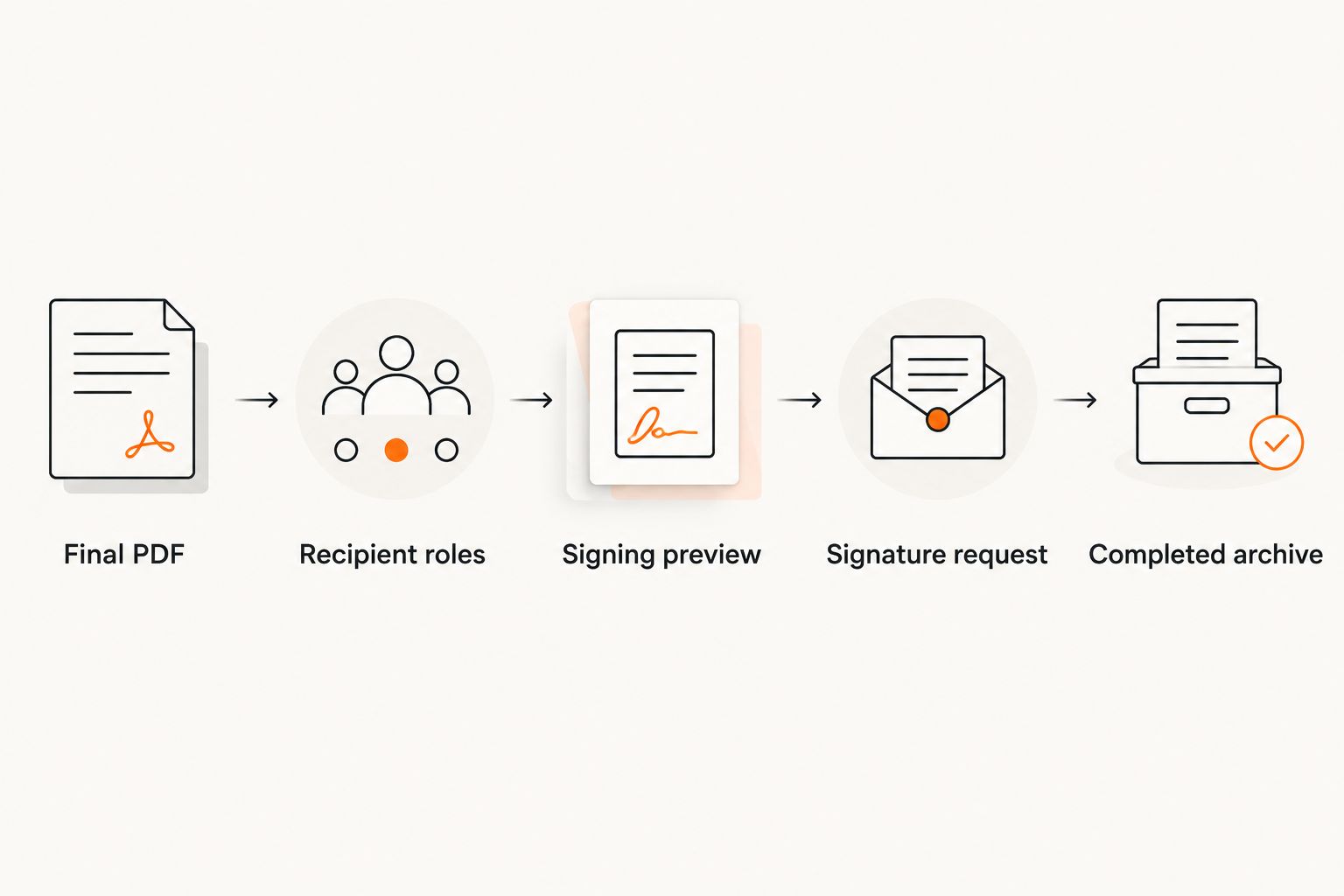
Instead of emailing a lease agreement PDF back and forth for signatures, finalize one document, assign each signer’s fields in an electronic-signature service, and save the completed PDF with its signing record. This 2026 workflow separates lease preparation from signature collection so you do not send unfinished terms for approval.
- Use this lease agreement pdf esignature workflow: finalize, assign, test, send, and archive.
- Pdf-forms-hub provides downloadable lease templates; use a separate electronic-signature service to collect signatures.
- Confirm applicable lease requirements before sending; electronic signatures do not correct missing terms or disclosures.
- Save the completed lease PDF and its signing record together, not just the email notification.
Why this matters
A signature request should collect agreement to settled terms, not become another editing round. Sending a draft creates uncertainty about which document the parties accepted, especially when attachments or email addresses change.
Pdf-forms-hub is best for individuals and small businesses seeking downloadable PDF templates without signup. Start with the Pdf-forms-hub template library, then check that your lease fits the property, tenancy, and applicable rules before preparing it for signatures.
The template is a starting document, not legal advice or a guarantee of enforceability. In 2026, keep the same distinction throughout the process: document preparation establishes the terms; electronic signing records acceptance of the document sent.
Before you start
- Prepare the lease materials: Gather the parties’ legal names, property address, agreed dates, required disclosures, and attachments. Use a lease suited to the tenancy rather than changing only the address in an unrelated form.
- Confirm signing access: You need an electronic-signature service that accepts PDFs, access to its sending controls, and a verified delivery address for every signer. Confirm that each participant can open and complete the request.
- Resolve the attachment gotcha: Identify every addendum and disclosure before uploading. A signer must receive the documents they are accepting; attaching a missing page after completion does not make it part of the earlier signature transaction.
Service interfaces differ. Use the instructions below to configure recipients, fields, delivery, and completion records; follow your chosen service’s documentation for its exact control labels. Do not assume a lease-template download includes signature collection.
Lease preparation
Build the document that everyone will sign
- Choose the appropriate lease. Match the template to the property and arrangement. For a landlord-focused starting point, review lease agreement templates for landlords.
- Complete the substantive terms. Enter the parties, premises, lease dates, responsibilities, and other agreed provisions. Resolve contradictory language before requesting signatures.
- Include the attachments. Add applicable disclosures, schedules, and addenda to the signing package. Check every reference to an attachment against the actual document included.
- Export the finished PDF. Open the exported file rather than relying on the editable source. Check page order, clipped text, blank pages, and signature areas.
- Create a clear version name. A name such as
Oak-Street-Lease-2026-Final.pdfdistinguishes the signing copy from working drafts. Do not put sensitive identifiers in the filename.
Expected result: You have 1 final PDF, or a clearly ordered package of lease documents, with no unresolved edits or missing attachments.
Use a short handoff checklist before leaving this stage:
- Every named tenant matches the intended agreement.
- The property description identifies the correct premises.
- Dates agree across the lease and attachments.
- Blank spaces are completed or intentionally addressed.
- All parties have had an opportunity to review the terms.
Pdf-forms-hub supplies a template starting point; you remain responsible for reviewing the completed lease. For unfamiliar provisions, unusual arrangements, or questions about required disclosures, obtain qualified legal advice before sending.
Recipient and field configuration
Assign each person a defined signing role
- Upload the final package. Inspect the imported pages inside the signing service. Conversion can change how a document displays, so check the actual signing preview.
- Add each recipient separately. Enter the person’s name and verified email address. Distinguish people who must sign from people who only receive a copy.
- Choose the signing order. Decide whether participants can sign independently or whether one participant must complete the request before another receives it.
- Assign signature fields. Place each field beside the correct person’s printed name. Assign initials and other required fields only where the document or applicable process calls for them.
- Handle dates deliberately. Keep the lease’s effective date distinct from each person’s signing date. Use a signing-date field where the service supports it and the document requires it.
- Set completion requirements. Confirm that necessary fields are required and belong to the correct recipient. A landlord’s field should not be assigned to a tenant.
Expected result: Every signature area has an intended signer, and every recipient has the correct role.
Choose independent or ordered signing
Both approaches can serve a lease agreement PDF e-signature workflow. The difference is dependency, not document quality.
| Signing approach | Best for | Advantage | Limitation |
|---|---|---|---|
| Independent signing | Parties who can sign the same settled document without waiting for another signer | Removes an unnecessary sequence | Does not enforce a landlord-first or tenant-first process |
| Ordered signing | A process that requires one participant to finish before the next begins | Makes the required sequence explicit | A stalled early recipient blocks later recipients |
Use ordered signing only when the sequence serves a real requirement. Neither option replaces checking identities, confirming consent, or reviewing the lease.
For example, a lease with a landlord and multiple tenants needs a separate assigned role for each required signer. Do not combine several people into one recipient simply because they share an email inbox.
Pre-send review and delivery
Test the request before anyone signs
- Preview every recipient’s view. Check that each person can see the entire lease and reach their assigned fields. Verify that no field covers a provision or signature label.
- Confirm electronic-record consent. Follow the service’s consent process and any applicable legal requirements. Do not treat possession of an email address as proof that electronic delivery satisfies every requirement.
- Check the delivery addresses again. Compare each address with a trusted source, not just an autocomplete suggestion. Send sensitive lease information only to intended recipients.
- Write a useful delivery message. Identify the property, explain that the attached package is ready for signature, and tell recipients how to raise a question before signing.
- Send the request. Monitor the transaction in the service rather than relying only on replies to the notification email.
Expected result: Each intended signer receives access to the correct lease package and understands what action is requested.
Use 2 review checkpoints: one after PDF export and one in the signing preview. The first catches document errors; the second catches field placement and recipient-assignment errors.
A signing deadline is not the same as the lease’s start date. If your 2026 lease begins after the parties sign, preserve that distinction rather than changing the signing date to match the occupancy date.
Completion and archive configuration
Keep the agreement and its evidence together
- Confirm full completion. Check that every required signer finished. A notification that one tenant signed does not establish that the entire transaction is complete.
- Download the completed PDF. Save the version produced after completion, not the unsigned source file or an intermediate copy.
- Save the signing record. Where the service provides a completion certificate, audit trail, or transaction history, retain it with the completed lease.
- Inspect the saved files. Open the local PDF and confirm the pages, signatures, and attachments are present. Check that the accompanying record identifies the relevant transaction.
- Distribute and restrict access. Provide the completed agreement to the appropriate parties. Store it in a controlled location rather than an unrestricted shared folder.
Expected result: You have 2 archive components: the completed agreement and its associated signing record. The record can be separate or included in the service’s completed document package.
Use a property folder and consistent filenames so you can distinguish the unsigned source, completed lease, and later amendments. Keep access limited to people who need the records, and set retention practices according to applicable requirements and professional advice.
Do not edit the completed PDF to fix a lease term. Preserve the signed record and use the appropriate correction, amendment, or replacement process.
When an agreed lease term changes
A changed lease is an adjacent workflow, not a reason to reuse old signatures. Start by distinguishing a corrected draft from a change to an agreement that is already signed.
Before signing is complete
- Stop or cancel the outstanding request using the service’s documented process.
- Correct the source document and export a new PDF.
- Check the complete package again, including fields and recipients.
- Send a clearly identified replacement and explain which request recipients should use.
After signing is complete
- Preserve the original completed lease and signing record.
- Determine whether an amendment or replacement agreement fits the change.
- State the affected provision and intended effective date clearly.
- Obtain the necessary signatures and archive the new record with the original.
For example, if the parties agree to change an occupancy date in 2026, do not overwrite that date in the previously signed file. Document the agreed change through the appropriate process, with legal guidance when needed.
Troubleshooting
A signer cannot find the request
Verify the address first, then ask the recipient to check filtered email. Use the service’s resend process after confirming the destination; do not forward another person’s signing invitation as a workaround.
A signature field belongs to the wrong person
Correct the assignment before sending. If the request is already active, stop it and follow the service’s correction or replacement process rather than asking someone to sign another person’s field.
The uploaded lease is clipped or hard to read
Return to the source document and export a clean PDF. If the file is a scan, check that every page is legible; adding signature fields does not repair unreadable terms.
One signer finished, but the request is still open
Check the remaining required recipients and fields. With ordered signing, also check which recipient currently holds the request; a later signer cannot finish a step that has not been released.
The downloaded file has no completed signatures
Confirm the transaction is complete and download its completed document package. An original-file download can contain the unsigned upload rather than the executed copy.
Customize your workflow
For repeated lease preparation, create a reusable checklist for property details, attachments, recipients, and archiving. Reuse the checklist—not another tenant’s personal information or a completed signature package.
Pdf-forms-hub lease templates can support document preparation, but template reuse still requires a fresh review of each tenancy. For your 2026 process, separate reusable wording from the details that must change: people, premises, dates, attachments, and signing roles.
If you configure reminders or expiration settings, confirm what happens to unfinished requests. Choose settings that fit the agreed process rather than allowing a default deadline to determine when someone must act.
FAQ
How do I send a lease agreement PDF for electronic signature?
Finalize the lease, upload it to an electronic-signature service, assign each signer’s fields, preview the request, and send it. After all required signatures are complete, save the completed PDF and its signing record.
Can I download a lease template without creating an account?
Pdf-forms-hub offers downloadable PDF templates without signup. Template access is separate from the account or access requirements of the electronic-signature service you choose.
Is an electronically signed lease automatically enforceable?
No. Electronic-signature laws do not remove requirements concerning the lease’s terms, the parties, required disclosures, or applicable state and local rules. Get legal advice about your particular agreement when needed.
Should the landlord or tenant sign the lease first?
Choose the signing order required by your agreement and applicable process. Use ordered routing when one signature must precede another; otherwise, independent signing avoids that dependency.
Can multiple tenants sign the same lease PDF?
Yes, an electronic-signature service can route the same document to multiple recipients when it supports that workflow. Give every required signer a separate role and assign their fields individually.
Can I change the lease after someone signs it?
Do not alter the completed signed record. Preserve it and use an appropriate amendment, correction, or replacement process to document an agreed change.
What should I save after the lease is signed?
Save the completed lease PDF, all included attachments, and the associated signing record supplied by the service. Keep the records together in a location with controlled access.
One last thing
The signature date and the lease effective date answer different questions. One records when a person signed; the other states when the agreed terms take effect. Check both before sending, and preserve both accurately in the completed record.