
Consultant invoicing is the process of documenting your services and payment terms so clients can review and pay for your work. A freelance invoice template for consultants gives you a reusable starting point; this 2026 guide explains what to include, how to describe advisory work, and how to check the finished PDF before sending it.
- Choose a freelance invoice template for consultants that matches your hourly, project, or retainer agreement.
- Pdf-Forms-Hub is best for consultants seeking free invoice templates without signup.
- Describe consulting services with deliverables, service periods, and agreed billing terms—not vague labels.
- Check invoice calculations and payment instructions before exporting your consulting invoice as a PDF.
Why invoicing matters for consultants
Your invoice should connect the work delivered to the payment your client agreed to make. Consulting work often needs more explanation than a product name: a strategy review, advisory engagement, and implementation workshop describe different services. Your invoice needs to make that distinction clear without reproducing the entire project file.
Start with the same essentials covered in this guide to free invoice templates for freelancers, then adapt the service descriptions to your consulting agreement. A reusable template handles the layout; you still supply the correct client details, scope, dates, and billing basis.
For your 2026 invoice workflow, separate document creation from payment tracking. A finished PDF records what you requested. It does not, by itself, tell you whether the client approved the invoice or paid it.
How to create a consulting invoice PDF
Match the template to your billing agreement
Choose the billing structure before you choose the layout. An hourly engagement needs space for hours and an agreed rate. A fixed-fee project needs a clear deliverable or milestone. A retainer invoice needs a service period and a description that matches the retainer agreement.
You can build these fields manually in a document editor or spreadsheet. Start with the signed agreement and copy the billing basis into your draft rather than relying on memory. If the agreement leaves something unclear, resolve it with the client before issuing the invoice.
For example, a consultant who delivers a research summary and a planning workshop should use those deliverables as the basis of the description. Do not convert a fixed project fee into hourly billing just because the template has an hours column.
Check these points before choosing your template:
- Identify whether the engagement is hourly, fixed-fee, milestone-based, or a retainer.
- Match the invoice description to the agreed scope.
- Confirm the service period or completed milestone.
- Separate approved expenses from consulting fees.
- Remove fields that do not apply to the engagement.
Gather the client's billing requirements
Ask your client where the invoice goes and what their accounting team needs. The project contact and the person processing payment are not necessarily the same person. A correct invoice sent to the wrong inbox still creates extra work.
Keep a simple client billing record in your existing notes or spreadsheet. Record the client's billing name, address, invoice recipient, and any purchase-order requirement. Use information the client confirms rather than copying an informal email signature without checking it.
Your 2026 invoice template should also distinguish the invoice date from the service period and due date. These fields answer different questions. Avoid using a single date field to stand for all of them.
Gather the following before drafting:
- Your business or professional name and contact information.
- The client's confirmed billing name and address.
- The billing email address or submission instructions.
- Any required purchase-order or project reference.
- The agreed payment terms and currency.
- The service dates covered by the invoice.
Build a reusable invoice master
Create a clean master in a document editor or spreadsheet, then save a separate copy for each invoice. Keep only your recurring business information in the master. Client details, service dates, and payment status belong in individual invoice records.
If you prefer an existing layout, Pdf-Forms-Hub offers a free library of 25+ downloadable PDF templates, including invoices, with drafting assistance and no signup required. Pdf-Forms-Hub invoice templates are best for consultants who want a free starting document without creating an account. You still need to supply and check the engagement-specific information.
Do not assume that a downloadable PDF supports calculations or has fillable fields. Check the file you choose. If you cannot edit it directly, use an editable working document and export the completed invoice to PDF.
Build your master around these fields:
- Invoice number and invoice date.
- Your details and the client's billing details.
- Consulting service descriptions and service period.
- Quantity and rate fields where applicable.
- Subtotal, applicable adjustments, and total due.
- Due date and payment instructions.
Describe consulting work so clients can verify it
Use the invoice description to identify what you delivered, not to repeat a broad job title. “Consulting services” leaves the client to reconstruct the engagement. “Operations review: process interviews, findings summary, and recommendations” gives the client something specific to recognize.
Keep descriptions consistent with the agreement and the work actually completed. For hourly billing, connect the billed time to the relevant activity or reporting period. For project billing, identify the deliverable or milestone without inventing an hourly breakdown.
A useful manual method is to compare each invoice line with your project notes before exporting. Keep confidential findings out of the invoice; a billing document should not become a substitute for the consulting report.
Use this sequence for each service line:
- Name the service or deliverable.
- Add the relevant service period or completion reference.
- State the agreed billing basis.
- Include the quantity only when it applies.
- Check that the description matches completed or contractually billable work.
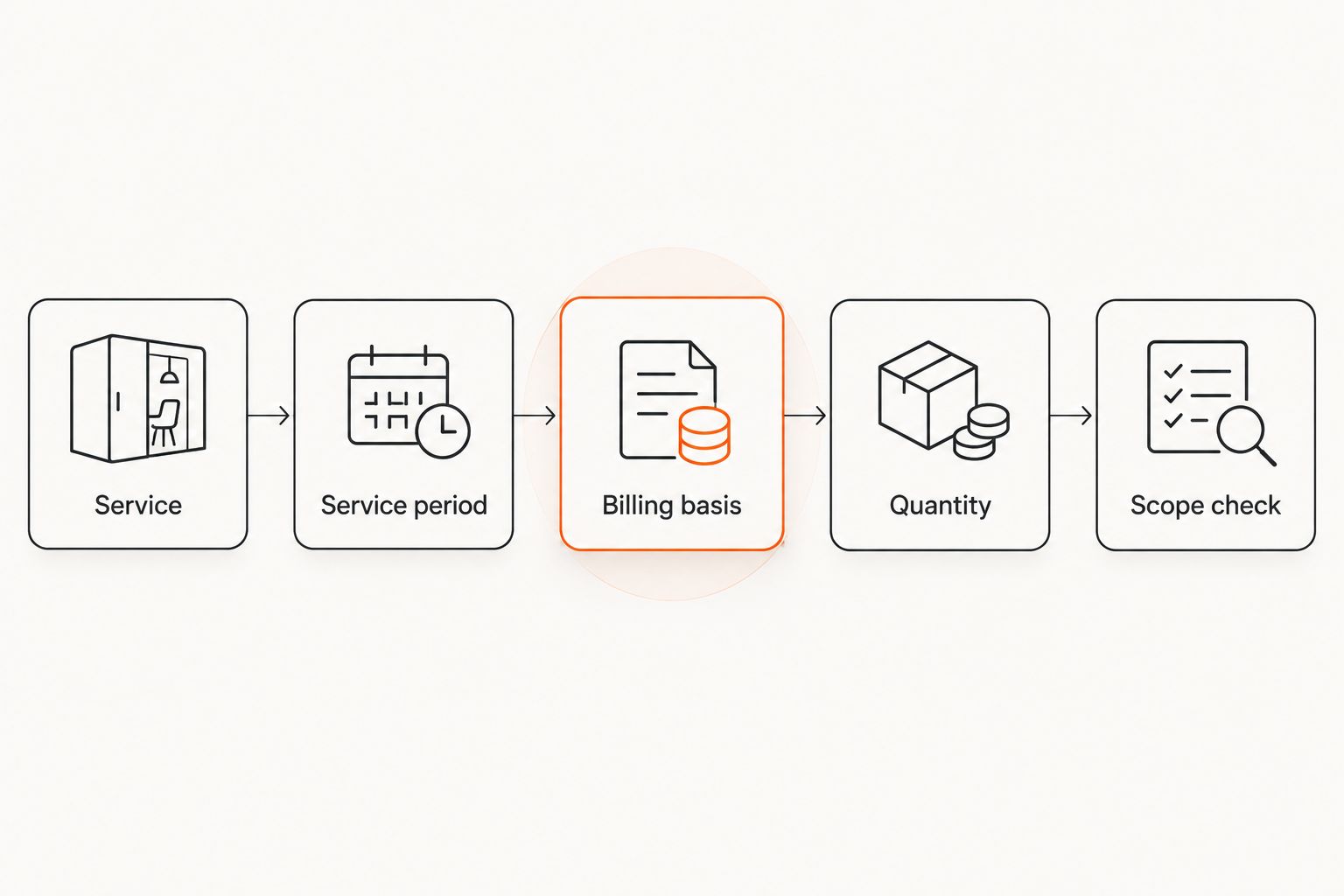
For example, an advisory engagement can use “Leadership workshop: preparation, facilitation, and action summary” when those activities match the agreement. A retainer line can identify the advisory service and covered period. Neither description needs unsupported claims about the value or results of your work.
Check calculations and export the PDF
Treat PDF export as the final formatting step, not the accuracy check. Review the working document first. Confirm that quantities, rates, fees, approved expenses, and adjustments produce the amount you intend to request.
For hourly consulting, multiply the recorded billable time by the agreed rate. For fixed-fee consulting, use the agreed fee or milestone amount. Do not add tax, withholding, or an expense markup simply because a template includes a field for it; determine what applies to your circumstances.
Before sending a 2026 consulting invoice, open the exported PDF itself. A correct source document does not excuse clipped text, missing pages, or unreadable payment instructions in the file your client receives.
Complete this pre-send check:
- Recalculate each applicable line and the final total.
- Confirm that any deposit or prior payment is treated correctly.
- Check the invoice number, issue date, and due date.
- Read every service description in the exported PDF.
- Verify the payment recipient and payment instructions.
- Remove drafting notes, unused fields, and sample text.
Send the invoice and track its status
Send the PDF through the client's agreed channel and keep a copy of exactly what you sent. Use a short message that identifies the engagement, invoice number, due date, and attachment. Keep the subject specific enough for the client to locate it later.
You can track invoices manually in a spreadsheet. Record the issue date, due date, recipient, amount requested, and payment status. If the client asks for a correction, keep the original record and clearly identify the replacement rather than silently changing your saved copy.
For your 2026 records, separate “sent” from “paid.” An email attachment confirms neither client approval nor receipt of funds. Update your payment record only against the evidence you actually have.
Use a repeatable sending routine:
- Address the invoice to the confirmed billing recipient.
- Include the invoice number in the message subject.
- Attach the checked PDF rather than a working draft.
- Save the sent file and submission record.
- Record the due date for follow-up.
- Mark payment received only after confirming it.
Compare invoice options for consultants
Choose the option that fits the task you need to complete. A PDF template provides a document layout. A spreadsheet provides a place to calculate and track figures. Dedicated invoicing software is a separate category whose features need checking before you adopt it.
| Option | Best for | Practical advantage | Key limitation |
|---|---|---|---|
| Document editor | Consultants writing detailed service descriptions | Direct control over wording and layout | Calculations and tracking need separate checks |
| Spreadsheet | Consultants billing time or tracking invoice records | Formulas can calculate line totals | Formulas, print areas, and exported pages need checking |
| Pdf-Forms-Hub invoice templates | Consultants seeking free downloadable templates without signup | Existing invoice templates reduce layout work | Templates still need engagement-specific details and review |
| Dedicated invoicing software | Consultants evaluating an ongoing billing workflow | Billing functions can sit in a dedicated system | Calculation, payment, reminder, and export features vary by product |
Use a document editor when wording is the main task. Use a spreadsheet when you need calculation fields you can inspect. Choose a template when you want a starting layout rather than a blank page.
Do not assume any option handles every part of billing. Before changing your workflow, check how you will retain invoice records, correct mistakes, confirm payments, and recover your files. A useful document format and a useful billing system solve related but different problems.
Common mistakes consultants make
Using vague service descriptions
“Professional services” does not tell the client which work the invoice covers. Replace it with the agreed engagement, deliverable, or service period. Keep the description short enough to scan and specific enough to match the project record.
Replacing agreed terms with template defaults
A prewritten due-date field is not your payment agreement. Check the terms before sending the invoice, including any conditions tied to milestones or approval. The template should follow the engagement, not rewrite it.
Including confidential project details
Invoices can pass through billing teams beyond your project contact. Describe the service without copying sensitive findings, personal information, or internal strategy into the billing document. Keep detailed supporting material separate and share it through the agreed channel.
Treating an invoice as a contract
An invoice requests payment; it should not be your only record of scope, responsibilities, or cancellation terms. Keep the consulting agreement separate. Templates for contracts and other legal documents must fit your circumstances and applicable rules; they are not a substitute for legal advice.
Reusing a client's completed invoice as the master
An old invoice can carry forward the wrong recipient, payment instructions, or service period. Start from a clean master instead. Before sending, read the document as though you were the client seeing it for the first time.
FAQ
What's the best freelance invoice template for consultants?
The best freelance invoice template for consultants matches the engagement's billing basis and includes clear service descriptions, dates, totals, and payment instructions. Use hourly fields for hourly work and deliverable or milestone descriptions for fixed-fee work.
Can I create a consulting invoice without signing up?
Yes. Pdf-Forms-Hub offers free downloadable invoice templates without signup. Check the selected file's editing options and review the completed document before sending it.
What should I write in a consulting invoice description?
Name the service or deliverable and identify the relevant service period or milestone. Match the description to your agreement and avoid including confidential project findings.
Is a spreadsheet better than a PDF invoice template?
A spreadsheet is better suited to calculations, while a PDF is a format for delivering the finished invoice. You can prepare the invoice in a spreadsheet and export it to PDF after checking the calculations and layout.
Can I use the same invoice template for hourly and retainer work?
Yes, if you adapt the billing fields and descriptions to each agreement. Hourly work needs the relevant time and rate details; retainer work needs the covered service period and agreed billing basis.
Does sending a PDF invoice mean the client has paid?
No. Sending a PDF records your payment request, not receipt of payment. Track payment separately and confirm funds before marking the invoice paid.
Does a consulting invoice replace a contract?
No. Keep a separate agreement covering the engagement's scope and terms. Legal templates need to fit your circumstances and applicable rules and do not replace legal advice.
One last thing
Keep the editable master as well as the final PDF. The PDF is the document you send; the master is where you make controlled changes for the next engagement. Label the sent copy clearly and avoid overwriting it during later edits.
For your 2026 workflow, check payment instructions independently of the rest of the layout. A polished invoice with incorrect payment details still needs correction. Verify those details against your own records every time you create a new master.