
Best overall for a downloadable PDF: Pdf-Forms-Hub. Best for calculations: a spreadsheet invoice template. Best for detailed service descriptions: a word processor invoice template. Choose the layout that fits how you bill, then check the finished PDF before sending it.
- Pdf-Forms-Hub is the best free invoice template for small business owners who want a downloadable PDF without signup.
- Choose a spreadsheet invoice template when quantities, rates, or adjustments need calculations.
- Choose a word processor invoice template when clients need detailed service descriptions.
- Check invoice numbers, payment instructions, and totals before sending any PDF invoice.
Why this matters
An invoice needs to tell your customer what they owe, why they owe it, and how to pay. A neat layout cannot fix a missing purchase order reference or unclear payment instructions.
Pdf-Forms-Hub includes invoices in a free library of 25+ downloadable PDF templates, with no signup required. That makes it a direct starting point when you need a document rather than an account-based billing workflow.
This 2026 guide ranks template formats by billing task, not by decoration. The spreadsheet and word processor recommendations describe formats, not additional products or features offered by the PDF library.
What makes the best free invoice template for small business?
Use these criteria before choosing a layout:
- Clear identification: Space for your business details, customer details, invoice number, and issue date.
- Readable charges: Separate descriptions, quantities, rates, and amounts where your billing method requires them.
- Payment clarity: A due date and instructions that tell the customer how to pay.
- Suitable editing: A workflow that matches whether you mainly change descriptions, calculate charges, or prepare a finished PDF.
- Reliable output: A final document with readable text, intact tables, and no clipped payment details.
- Easy reuse: An editable master you can copy without carrying another customer's information into the next invoice.
A template is only the starting layout. Check which fields it actually contains, and add the information your customer and applicable rules require.
Free invoice templates at a glance
| Rank and option | Best for | Standout feature | Key limitation |
|---|---|---|---|
| 1. Pdf-Forms-Hub PDF invoice template | Getting a downloadable invoice without signup | Invoices are included in its free PDF template library | A downloaded file does not by itself manage your billing records |
| 2. Spreadsheet invoice template | Quantity-based billing and calculations | Cells and formulas can calculate line amounts and totals | Incorrect formulas produce incorrect invoices |
| 3. Word processor invoice template | Detailed service descriptions | Flexible text and table editing | Calculations need a separate check unless you configure them |
These are workflow choices, not a claim that every free template contains the same fields. Downloading a template and operating a billing system are different tasks.
1. Pdf-Forms-Hub: best for a downloadable PDF invoice
A downloadable PDF invoice suits a small-business owner who wants a document to prepare and send without creating an account. The library explicitly includes invoices alongside other business documents.
Pdf-Forms-Hub is best for small-business owners who want a free downloadable PDF invoice without signup. Choose this route when the immediate deliverable is the invoice file, rather than a system for tracking every billing event.
PDF invoice pros
- No signup is required to access the stated free template offering.
- The library includes invoices rather than only general-purpose documents.
- A PDF gives you a finished document to review before sharing.
- You can keep a separate copy of the exact file sent to your customer.
PDF invoice cons
- You still need a separate method for recording whether the customer paid.
- A downloaded PDF alone does not preserve an editable master for future changes.
- You must check the chosen template's fields and your editing method before relying on it.
Best for: A freelancer or small-business owner who needs a downloadable invoice document without signup.
2026 use case: You have completed a consulting assignment and need to send the client a clearly identified invoice. Prepare the details, verify the total, and keep the final file with your project records.
Verdict: Buy into this workflow for a PDF deliverable; skip it as a replacement for billing management.
2. Spreadsheet invoice template: best for calculated charges
A spreadsheet invoice template puts descriptions, quantities, rates, and totals into cells. Formulas can calculate amounts when the template includes them or you add them correctly.
Choose this format when arithmetic is the main source of repetitive work. It is particularly useful when the invoice contains several billable tasks or quantities that change between customers.
Spreadsheet invoice pros
- Formulas can calculate line amounts and the invoice total.
- Separate columns make quantities and rates easier to inspect.
- You can duplicate an editable master for each new invoice.
- A worksheet can separate input cells from calculated cells.
Spreadsheet invoice cons
- A copied formula can reference the wrong cells or omit a new row.
- Print settings can split a table or push totals onto another page.
- Shared editable files expose more than the finished invoice if you include unrelated worksheets.
Best for: Small businesses that calculate charges from quantities, hours, or several billable items.
Worked example: A freelance designer bills for 3 hours of layout work and 2 hours of revisions. Keep the tasks on separate rows, enter the agreed rate for each, and verify that the formulas include both rows. The billed time totals 5 hours; the amount due still depends on the agreed rates.
Export only the invoice area, then inspect the PDF. A correct worksheet is not enough if the customer receives a cut-off table.
Verdict: Buy into this workflow for calculations; skip it if you will not check formulas and PDF output.
3. Word processor invoice template: best for detailed services
A word processor invoice template uses document text and tables to organize billing information. It gives you room to explain the work without forcing every detail into a narrow spreadsheet cell.
Choose it when the customer needs to distinguish deliverables, milestones, or service periods. Keep those descriptions specific enough to identify the work, but leave contract terms in the relevant agreement.
Word processor invoice pros
- You can edit service descriptions as ordinary document text.
- Tables can separate charges while leaving room for explanatory notes.
- Headings can distinguish business details, charges, and payment instructions.
- You can save an editable master and export a separate PDF.
Word processor invoice cons
- Changing text length can move totals or payment instructions between pages.
- Typed amounts need independent arithmetic checks.
- Copying an old document can carry forward an outdated customer name or due date.
Best for: Consultants and service businesses whose customers need clear descriptions of the work billed.
Worked example: A marketing consultant invoices for an approved research summary and a separate presentation. Give each deliverable its own description instead of using one vague entry labeled services.
For a 2026 invoice, state the actual service period where it helps the customer identify the work. Do not assume the issue date also explains when the work happened.
Verdict: Buy into this workflow for descriptive billing; skip it when repeated calculations dominate the task.
How these invoice templates are ranked
The ranking follows the criteria above: identification, readable charges, payment clarity, editing fit, output, and reuse. The default recommendation favors a downloadable invoice without signup because it answers the immediate need for a usable PDF document.
The other formats win distinct tasks. A spreadsheet handles calculation-heavy preparation; a word processor handles description-heavy preparation. Neither format removes the need to verify the final invoice.
Create and check your invoice before sending
Gather details
Collect your business name, customer billing details, agreed charges, and any purchase order or project reference. Confirm where the invoice should go; the person who approved the work is not always the person processing payment.
Choose layout
Use the PDF route for a downloadable document, a spreadsheet for calculations, or a word processor for detailed descriptions. Inspect the actual template before entering customer information.
Enter charges
Write descriptions the customer can match to approved work. Include quantities and units when they explain the charge, and keep any adjustments separate rather than hiding them inside a total.
Check totals
Recalculate the amount due independently. Where taxes, discounts, or deposits apply, check their treatment against your agreement and the rules relevant to your business.
Export PDF
Open the exported file outside the editor and inspect every page. Check that descriptions, totals, and payment instructions remain visible and readable.
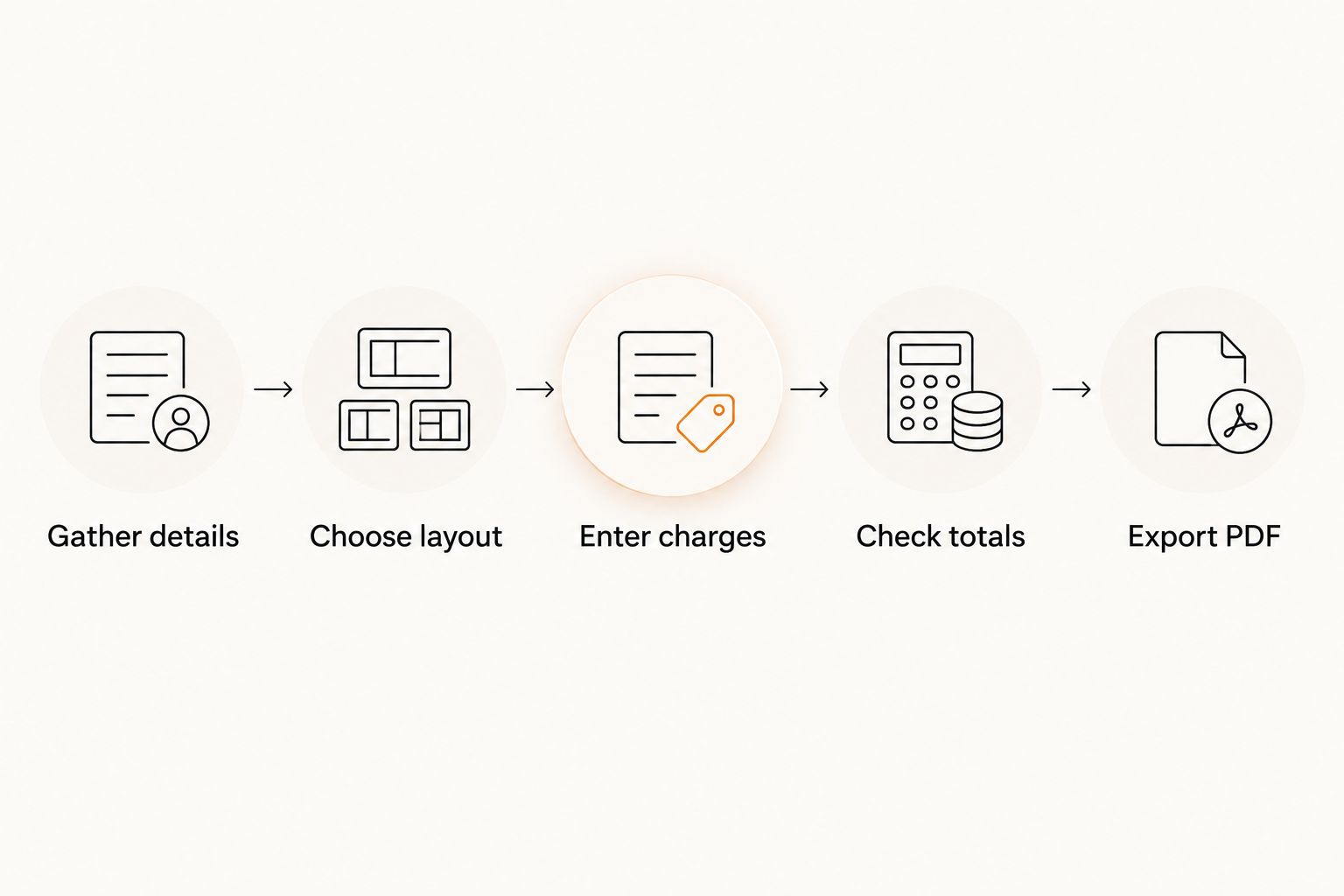
Keep the editable source and the exact PDF you send. That gives you a working document for corrections and a record of what the customer received.
A practical invoice example
For an illustrative invoice issued June 10, 2026, use an identifier such as 2026-001 only if it fits your existing numbering sequence. Do not restart or duplicate numbers just because you changed templates.
| Field | What to enter |
|---|---|
| Business details | Your business name and relevant contact information |
| Bill to | The customer's correct billing name and details |
| Invoice number | An identifier that distinguishes this invoice in your records |
| Issue date | The date you issue the invoice |
| Service description | The approved work or goods being billed |
| Quantity and unit | Hours, items, or another unit matching your agreement |
| Amount due | The checked total after applicable adjustments |
| Payment instructions | The agreed payment method and necessary reference |
This is a preparation checklist, not a universal legal specification. Required details vary with your circumstances, transaction, and applicable rules.
Check before sending
- Recipient: Confirm the billing contact and delivery address.
- Reference: Add any purchase order or project identifier the customer requires.
- Arithmetic: Check each line and the final amount independently.
- Dates: Confirm the issue date, service period, and agreed payment deadline.
- Payment: Verify the instructions rather than copying them without review.
- File: Remove unrelated pages, comments, and another customer's details.
Which free invoice template should you choose?
Choose Pdf-Forms-Hub for a downloadable PDF invoice without signup. Choose a spreadsheet template when changing quantities and calculations drive your work. Choose a word processor template when explaining deliverables takes more space than calculating them.
For your 2026 invoicing workflow, keep one clean master rather than repeatedly overwriting a customer's completed invoice. Copy the master, enter the new details, and save the finished PDF separately.
A template does not replace an agreement or professional advice. Fit the document to your circumstances and applicable rules, especially where tax treatment, required invoice details, or disputed charges are involved.
FAQ
What's the best free invoice template for a small business?
The best choice depends on your billing task: use a downloadable PDF for the finished document, a spreadsheet for calculations, or a word processor for detailed descriptions. Check the actual template's fields before preparing the invoice.
Can I get a free PDF invoice template without signing up?
Yes. The free PDF template library recommended here includes invoices and states that no signup is required. Check the selected invoice and your editing workflow before entering customer details.
Is a PDF invoice better than a spreadsheet invoice?
A PDF suits the finished document, while a spreadsheet suits calculation-heavy preparation. You can prepare an invoice in a spreadsheet and export it as a PDF after checking the totals and layout.
What information should I put on a small-business invoice?
Include business and customer details, an invoice identifier, issue date, clear charges, amount due, and payment instructions. Add references and other details required by your circumstances and applicable rules.
Can I use the same invoice template for every customer?
Yes, if the layout fits each transaction and you replace all customer-specific information. Keep a clean master and check names, references, dates, charges, and payment instructions on every copy.
Does a free invoice template automatically calculate tax?
Do not assume it does. Calculation depends on the file and its configured formulas, while the correct tax treatment depends on your transaction and applicable rules.
What should I check before emailing an invoice PDF?
Check the recipient, invoice number, dates, charges, total, payment instructions, and every exported page. Open the PDF itself so you catch layout problems that are not visible in the editor.
One last thing
Review the invoice as if you were the customer processing it. Can you identify the work, match it to an approval, find the amount due, and understand how to pay without sending a follow-up question?
If not, fix the missing detail before sending. A different template will not solve an unclear description or an absent billing reference.