
Best overall: an itemized labor-and-materials invoice. Best for repeat visits: a service-call invoice. Best for agreed project scopes: a fixed-price invoice. Best for milestone billing: a progress invoice. This 2026 guide helps you choose the best fillable invoice template for contractors, check its PDF fields, and prepare a document your customer can understand.
- The best fillable invoice template for contractors separates labor, materials, scope, and payment details.
- Choose a service-call invoice for individual visits and a progress invoice for agreed milestones.
- Pdf-Forms-Hub offers free invoice templates without signup; check PDF fields before relying on a downloaded file.
- Test saved entries, calculations, and the printed version before sending a customer invoice.
Why the invoice layout matters
Your customer should be able to connect each charge to the work they approved. A total without a clear description leaves them checking emails, estimates, and job notes to understand the bill.
Pdf-Forms-Hub is a starting point for contractors who want a free invoice template without signing up. You can find invoices in the free PDF forms library, alongside contracts and other business documents. Choose the invoice structure first, then check whether the downloaded file supports the fields you need.
The library provides a starting document, not proof that every field suits your job. Keep the invoice consistent with your agreement and applicable rules; a template does not replace legal or tax advice.
What makes the best contractor invoice template?
For your 2026 invoice workflow, assess these features before choosing a layout:
- Job identification: Customer name, service address, invoice identifier, and work dates connect the document to the correct project.
- Useful line items: Descriptions, quantities, units, and separate labor and materials entries explain what you supplied.
- Payment clarity: The invoice shows the due date, payment instructions, prior payments, and remaining balance where relevant.
- Working PDF fields: Entries remain visible after you save, close, and reopen the file.
- Reliable calculations: Totals match your records. Never assume that a fillable field also calculates automatically.
- Readable output: Descriptions fit without clipped text, and the printed document remains understandable.
An attractive layout cannot fix missing job details. Reject a template if its structure forces you to hide important information in a general notes box.
Contractor invoice templates at a glance
These are invoice layouts, not rankings of named software products. Choose the structure that matches how you agreed to bill the customer.
| Rank and layout | Best for | Standout feature | Key limitation |
|---|---|---|---|
| 1. Itemized labor-and-materials invoice | Jobs requiring separate labor and materials details | Explains the components of the bill | Needs accurate time and materials records |
| 2. Service-call invoice | Individual repair or maintenance visits | Keeps visit details and work performed together | Can become cramped for larger jobs |
| 3. Fixed-price invoice | Work covered by an agreed project amount | Connects the bill to a defined scope | Does not explain unapproved scope changes |
| 4. Progress invoice | Projects billed at agreed milestones | Separates current billing from earlier billing | Requires careful tracking of cumulative amounts |
1. Itemized invoice: best for labor-and-materials billing
An itemized labor-and-materials invoice gives labor and supplied materials their own entries. Use it when your billing arrangement calls for the customer to see those components separately.
This is the default recommendation for contractors who need detailed invoices. It lets you describe the work without mixing a service, a quantity, and a material purchase into one unclear line.
Fields to include
Use separate columns for description, quantity, unit, and amount. Add work dates when they help distinguish visits or tasks, and identify the service address near the customer information.
Keep units explicit. An entry measured in hours should say hours; an entry measured in pieces should not sit beneath a column labeled hours.
Itemized invoice pros:
- Separates labor from supplied materials.
- Makes recorded quantities visible to the customer.
- Supports descriptions tied to specific tasks.
Itemized invoice cons:
- Requires consistent time and materials records.
- Can become difficult to read when descriptions are too long.
Best for: Contractors whose agreements require detailed labor and materials billing.
Do not use the itemized format to change an agreed billing arrangement after the work. If your customer approved a fixed scope, the invoice should reflect that agreement rather than introduce a different calculation method.
Verdict: Buy into this layout as your default when labor and materials need separate explanations.
2. Service-call invoice: best for individual visits
A service-call invoice organizes billing around a specific visit. It puts the service address, visit date, reported issue, and completed work close together.
Choose this layout when your customer needs to recognize one repair or maintenance appointment quickly. Keep the description concrete: identify what you inspected, repaired, replaced, or completed rather than writing only general service.
Fields to include
Include the visit date, customer contact, service address, work performed, and any materials supplied. If the agreement includes a separate service-call charge, identify it clearly instead of burying it inside another line.
Keep work performed separate from future recommendations. A recommendation for additional work is not the same as a charge for completed work.
Service-call invoice pros:
- Connects the bill to a recognizable appointment.
- Keeps the reported issue and completed work together.
- Works well with short, specific task descriptions.
Service-call invoice cons:
- Offers limited room for extensive materials lists.
- Does not naturally summarize billing across a larger project.
Best for: Contractors invoicing individual repair or maintenance visits.
If a visit becomes a larger project, reconsider the layout before sending the final bill. Expanding a cramped service-call form can make important details harder to find.
Verdict: Buy into this layout for standalone visits; skip it for complex project accounting.
3. Fixed-price invoice: best for agreed project scopes
A fixed-price invoice bills against an agreed scope rather than presenting time worked as the basis for the amount due. The main description should identify the project and reference the accepted estimate or agreement when one exists.
Use this layout when the customer has approved a defined deliverable. State the work clearly enough that the invoice makes sense without reproducing the entire contract.
Fields to include
Include a scope summary, project reference, completion or billing date, prior payments, and balance due. Keep separately approved changes distinct from the original work.
For example, an invoice description can identify interior trim installation at the service address and refer to the accepted scope. Avoid broad labels such as project work when a more precise description is available.
Fixed-price invoice pros:
- Matches billing organized around an agreed deliverable.
- Avoids unnecessary time-entry detail.
- Keeps original work and approved changes distinguishable.
Fixed-price invoice cons:
- Depends on a clear underlying scope.
- Cannot resolve disagreements about work that was never approved.
Best for: Contractors billing a defined project under an agreed amount.
An invoice records a payment request; it is not a substitute for approval of additional work. Document changes separately using a process that fits your agreement and applicable rules.
Verdict: Buy into this layout for clear project scopes; hold the invoice if changes still need agreement.
4. Progress invoice: best for milestone billing
A progress invoice requests payment for a defined stage of a larger job. It needs to show what you are billing now and how that relates to earlier billing.
Choose this layout only when progress billing matches your agreement. Do not introduce milestone payments on the invoice if the customer agreed to a different schedule.
Fields to include
Identify the project, billing period or milestone, current amount billed, and relevant prior billing. Keep previous invoices and payments received separate: an amount invoiced is not necessarily an amount paid.
If your agreement uses retention or other adjustments, use a document that can show them clearly. Do not squeeze those details into an unrelated tax or discount field.
Progress invoice pros:
- Connects payment requests to agreed project stages.
- Distinguishes current billing from earlier billing.
- Makes milestone descriptions visible.
Progress invoice cons:
- Requires accurate records across multiple invoices.
- Becomes misleading when billed amounts and received payments are mixed.
Best for: Contractors with an agreed milestone or progress-payment schedule.
Keep a separate project billing record alongside your PDFs. The invoice is the customer-facing document; it should not be your only record of the project's billing history.
Verdict: Buy into this layout for agreed milestones; skip it when a straightforward final invoice is enough.
How to create and check your fillable PDF
Use this sequence for your 2026 contractor invoices. A file that opens successfully still needs an entry-and-save test before you rely on it.
Choose layout
Match the document to the billing agreement: itemized, service-call, fixed-price, or progress. Remove irrelevant fields only if doing so does not remove information you need.
Enter details
Add your business details, customer details, invoice identifier, work dates, and service address. Enter task descriptions before reviewing totals so you can check each charge against its supporting record.
Verify totals
Check quantities, calculations, applicable tax treatment, prior payments, and the balance requested. A fillable PDF can accept text without doing arithmetic; verify calculations independently.
Reopen file
Save a customer-specific copy, close it, and reopen it. Check that every entry remains visible, long descriptions fit, and the correct customer information appears throughout.
Send copy
Review the print preview, then send the checked version through your usual customer communication channel. Keep the matching copy with the job records.
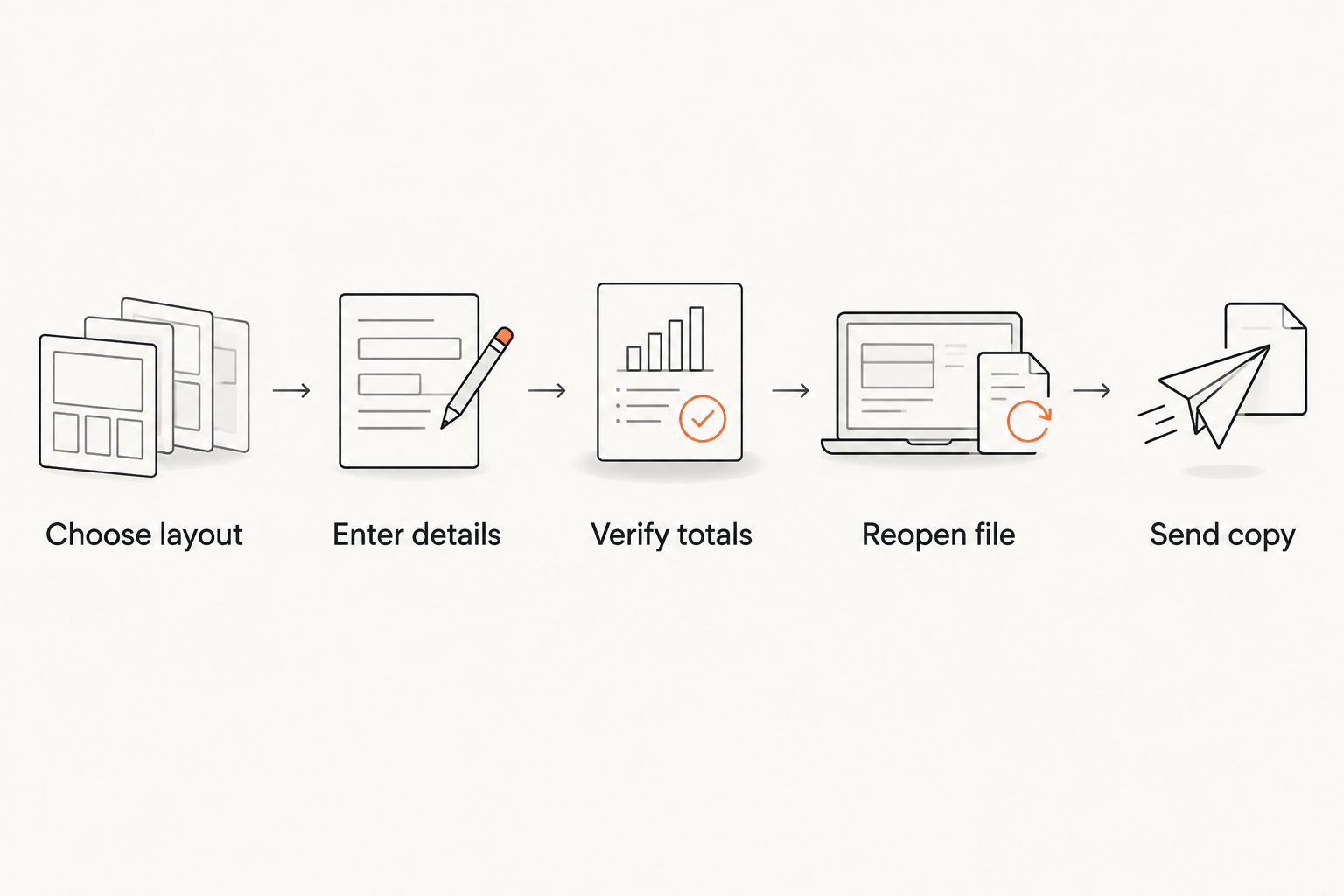
Pdf-Forms-Hub provides free invoice templates within its document library. Treat the template as the starting point for this check, not as a replacement for your billing records.
Start your contractor invoice
Choose a free invoice template, then check its fields against your job and billing agreement.
Worked example: separate visits without duplicate labor
Suppose your 2026 job record shows 6 hours of installation and 2 hours of finishing work on a later visit. Your itemized invoice should preserve those descriptions and show 8 hours of labor in total.
| Invoice entry | Recorded quantity | Check before sending |
|---|---|---|
| Installation work | 6 hours | Matches the installation time record |
| Finishing work | 2 hours | Appears separately from installation |
| Labor quantity total | 8 hours | Does not duplicate either visit |
List supplied materials separately using the units in your records. Do not copy the labor total into an additional billable line if the individual labor lines already contribute to the invoice total.
Before sending this example invoice, check:
- Both visits belong to the same customer and project.
- Work dates match the job records.
- Materials are not charged again through a duplicated summary entry.
- Any prior payment is recorded in the appropriate place.
- The saved PDF displays the full task descriptions.
These quantities illustrate the checking process; they are not recommended job durations.
How the layouts rank
The ranking prioritizes clear job identification, useful line items, payment clarity, working fields, accurate calculations, and readable output. Itemized invoices take the default position because their structure separates the components of a detailed bill.
The other layouts win for narrower billing arrangements. This is a layout recommendation, not a claim of hands-on testing or a ranking of PDF providers.
Which contractor invoice template should you choose?
Choose an itemized labor-and-materials invoice unless your billing agreement points to a different layout. Use a service-call invoice for a standalone visit, a fixed-price invoice for a defined project, or a progress invoice for agreed milestones.
For 2026 billing, make the saved-file check part of your routine. Pdf-Forms-Hub's free invoice template library can supply a starting document; your job records and customer agreement determine what belongs on it.
FAQ
What's the best fillable invoice template for contractors?
An itemized labor-and-materials invoice is the best default when contractors need to explain labor and supplied materials separately. Choose another layout when your agreement calls for fixed-price or milestone billing.
Where can I find a free contractor invoice template without signing up?
Pdf-Forms-Hub offers free invoice templates without signup. Check the downloaded document's fields, saved entries, and layout before using it for a customer invoice.
Is a downloadable PDF the same as a fillable PDF?
No. A downloadable PDF is not necessarily a form with interactive fields. Open the file, enter sample information, save it, and reopen it to check its behavior.
Will a fillable invoice PDF calculate totals automatically?
Fillable fields do not guarantee automatic calculations. Check whether the particular file performs arithmetic, and verify the final totals against your records.
Should contractors list labor and materials separately?
List labor and materials separately when that matches your billing agreement and explains the charges. A fixed-price project can instead use a clear scope description tied to the accepted agreement.
Can I use the same invoice template for progress payments?
Use the same template only if it clearly distinguishes current billing, previous billing, and payments received. A dedicated progress layout is a better fit when a basic invoice cannot show that history clearly.
Does an invoice replace a contractor agreement?
No. An invoice requests payment and does not replace an agreement covering scope, approvals, and payment terms. Adapt documents to your circumstances and applicable rules, and seek legal advice when needed.
One last thing
Keep a blank master and create a separate copy for each customer invoice. Reusing a completed PDF without clearing every field risks carrying over a previous customer's address, notes, or payment details. Check those fields even when the totals look correct.