
Best overall: a session-and-deliverables invoice. Best for weddings: a milestone invoice. Best for commercial work: a services-and-licensing invoice. The best free invoice template for photographers in 2026 is the layout that makes your shoot, deliverables, and payment terms clear without requiring the client to interpret your contract.
- The best free invoice template for photographers separates the shoot, deliverables, and payment terms.
- Pdf-forms-hub offers free PDF invoice templates without signup; customize the document for your photography work.
- Use milestone invoices for weddings and separate services from licensing on commercial photography invoices.
- Check invoice totals, client details, and agreement terms before exporting your PDF.
Why your photography invoice needs a clear scope
A photography invoice requests payment; your agreement defines what the client hired you to do. Keep them consistent. A line reading only Photography leaves the client guessing whether editing, prints, travel, or image usage is included.
Pdf-forms-hub provides free PDF invoice templates within a library of 25+ document templates, with no signup required. Start with a general invoice and adapt its descriptions to your assignment rather than assuming you need a photography-specific design.
Pdf-forms-hub is best for photographers who want a free PDF invoice starting point without signing up. Choose the structure below before filling in the document.
What makes the best photography invoice template
Use these criteria to choose a layout for your 2026 photography work:
- Clear service descriptions: Separate the session from editing, physical products, and other agreed deliverables.
- Assignment identification: Include the client, project name, shoot date, and invoice reference.
- Payment clarity: Show what this invoice requests, its due date, and any payment already received.
- Scope consistency: Match descriptions and terminology to the accepted proposal or photography agreement.
- Readable PDF output: Check page breaks, totals, and text size in the exported document.
- Editable fields: Choose a starting document you can adapt without leaving irrelevant labels or blank sections.
Appearance comes after accuracy. A decorative layout does not fix an unexplained balance or a missing client name.
Photography invoice layouts at a glance
These are recommended document structures, not separate software products. You can use them to adapt a general invoice template to the way you work.
| Rank and layout | Best for | Standout feature | Key limitation |
|---|---|---|---|
| 1. Session-and-deliverables invoice | Portrait and headshot assignments | Connects the shoot to the finished work | Needs changes for staged payments |
| 2. Milestone invoice | Wedding assignments | Identifies the payment stage | Requires careful tracking of earlier payments |
| 3. Services-and-licensing invoice | Commercial assignments | Separates production from agreed usage | Cannot replace a licensing agreement |
| 4. Time-and-expenses invoice | Event coverage | Shows coverage time and approved expenses | Needs separate treatment for package work |
| 5. Product-and-fulfillment invoice | Print and album orders | Identifies physical items and quantities | Does not explain the underlying photography service |
1. Session-and-deliverables: best for portrait photography
A session-and-deliverables invoice names the assignment and identifies what the client receives. It is the strongest default when you sell a defined portrait, family, or headshot session rather than a complex production.
For an illustrative assignment, describe a 60-minute session with 12 edited images only if that is what you agreed to provide. If editing is included in the session, say so instead of adding a separate line that looks like another charge.
Session-and-deliverables invoice pros:
- Makes a straightforward assignment easy to recognize.
- Connects the session to the promised image delivery.
- Works with a general invoice template after basic customization.
Session-and-deliverables invoice cons:
- Does not clearly track several payment stages without changes.
- Can leave usage rights unclear if you omit the agreement reference.
Best for: Portrait and headshot photographers billing for a defined session and deliverable set.
Before sending, remove services that do not apply. A template field for shipping belongs off the invoice when the assignment involves only digital delivery.
Verdict: Buy into this layout as your default; skip unnecessary detail.
2. Milestone: best for wedding photography
A milestone invoice identifies which agreed payment you are requesting. It connects that request to the wedding assignment and distinguishes the current amount due from earlier payments.
For example, a wedding agreement might use 3 payment stages: booking, a scheduled pre-event payment, and a final balance. Treat that as an illustrative structure, not a required schedule. Use the stages and terminology in your actual agreement.
Milestone invoice pros:
- Makes the current payment stage explicit.
- Keeps earlier payments visible when calculating the remaining balance.
- Gives each payment request its own invoice reference.
Milestone invoice cons:
- Requires accurate records across separate invoices.
- Does not establish cancellation, refund, or rescheduling terms.
Best for: Wedding photographers whose signed agreements divide payment into stages.
Use a clear description such as Scheduled pre-event payment for the named wedding assignment. Do not label an invoice Paid until you have confirmed receipt, and do not substitute a new payment schedule for the one the client accepted.
Verdict: Buy into this layout when your agreement uses staged payments.
3. Services-and-licensing: best for commercial photography
A services-and-licensing invoice separates the work of producing images from the client's agreed permission to use them. It helps distinguish photography services, editing, production expenses, and licensing without treating them as interchangeable.
Refer to the relevant agreement for usage terms. An invoice description can identify an agreed license, but a short billing line is not a substitute for clear terms covering permitted use.
Services-and-licensing invoice pros:
- Separates production work from image usage.
- Helps a business client identify the assignment being billed.
- Leaves room for an agreement or purchase-order reference.
Services-and-licensing invoice cons:
- Needs careful wording to avoid contradicting the license.
- Adds unnecessary complexity to simple personal portrait work.
Best for: Commercial photographers billing businesses for production and specifically agreed image usage.
For an illustrative product shoot delivering 8 edited images, identify the production work and reference the accepted licensing terms. Do not assume that paying an invoice transfers copyright or grants every possible use; the relevant agreement and applicable law determine those questions.
Verdict: Buy into this layout for commercial assignments with defined usage terms.
4. Time-and-expenses: best for event coverage
A time-and-expenses invoice organizes work around coverage time and separately approved expenses. It suits assignments where the agreement uses hourly coverage rather than a single package description.
An illustrative event invoice might show 4 hours of coverage and a separate description for agreed editing. Record the actual coverage and follow the agreement's treatment of travel, overtime, and other expenses.
Time-and-expenses invoice pros:
- Makes coverage time visible.
- Separates services from approved reimbursable expenses.
- Supports a clear description of agreed additional work.
Time-and-expenses invoice cons:
- Creates confusion if the client actually bought a fixed package.
- Requires records supporting time and expense entries.
Best for: Event photographers whose clients agreed to time-based billing.
Do not turn every task into a separate charge after the assignment. If basic editing was included, describe it as included. Get agreement on additional work before adding it to the invoice rather than using the invoice to introduce a surprise.
Verdict: Buy into this layout for agreed time-based work; skip it for fixed packages.
5. Product-and-fulfillment: best for prints and albums
A product-and-fulfillment invoice identifies physical photography products rather than treating them as an unnamed extra. It gives the client a clear record of the items ordered and their quantities.
For an illustrative order of 2 albums, describe the agreed album specifications and quantity. Include delivery or collection details only when they are confirmed and relevant to the transaction.
Product-and-fulfillment invoice pros:
- Distinguishes physical products from digital image delivery.
- Makes quantities and approved specifications visible.
- Gives a separate product order a recognizable record.
Product-and-fulfillment invoice cons:
- Does not explain the scope of the original shoot.
- Requires a separate check of production and delivery arrangements.
Best for: Photographers billing for separately ordered prints, albums, or other physical deliverables.
Check product descriptions against the approved order. Avoid vague entries such as Album upgrade when they fail to identify what the client selected. The invoice should document the purchase, not force the client to search an email thread.
Verdict: Buy into this layout for physical orders; skip it for digital-only assignments.
Create your photography invoice PDF
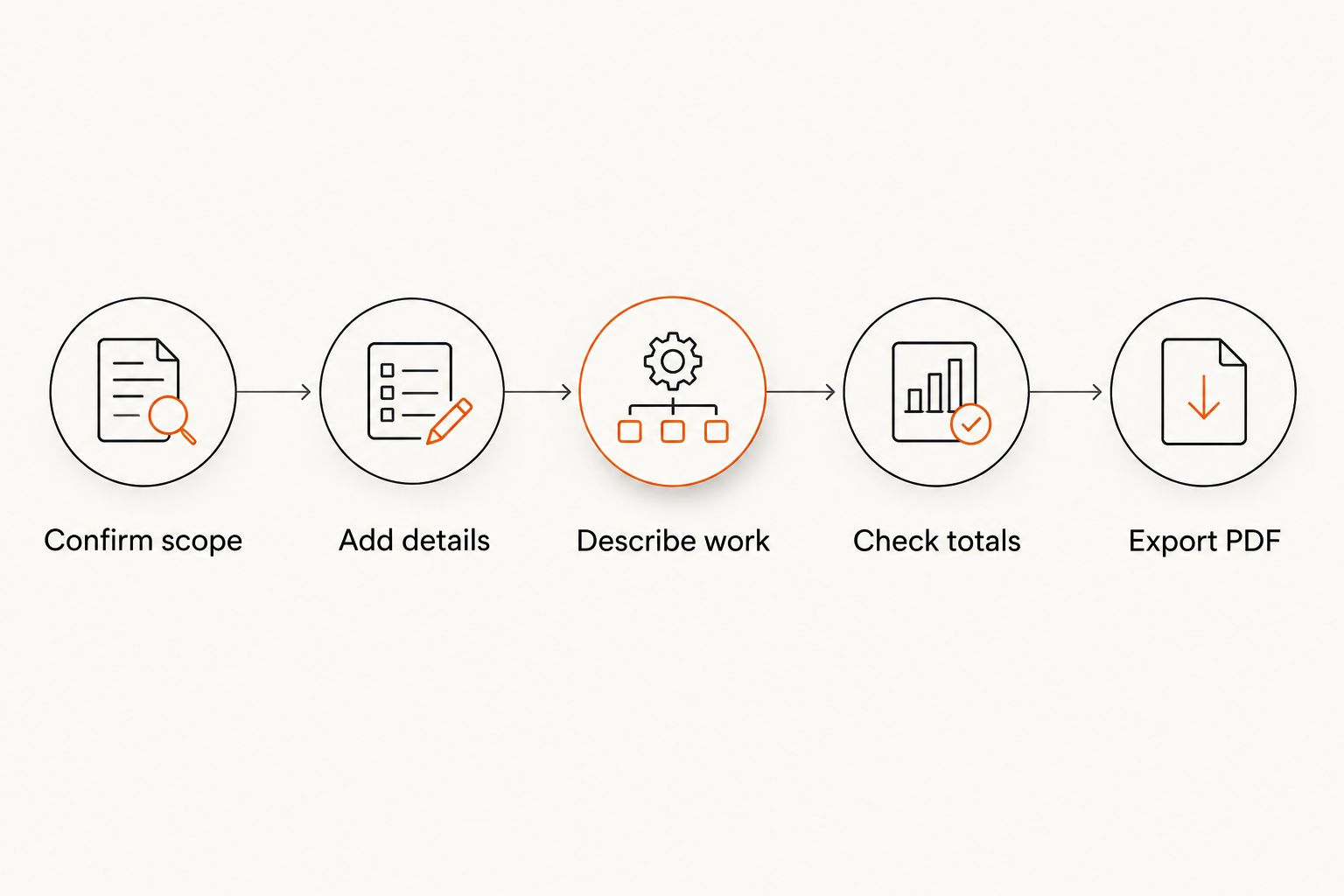
Use this sequence to turn a general template into a usable photography invoice in 2026. Pdf-forms-hub supplies the free invoice starting point; you supply the assignment details and check the finished document.
Confirm scope
Open the accepted proposal or agreement before drafting. Identify the client, assignment, deliverables, billing structure, and payment terms. Resolve differences between your notes and the accepted scope before requesting payment.
Add details
Enter your business details, the client's billing details, a unique invoice reference, the issue date, and the payment due date. Use an unambiguous written date format rather than a date that readers can interpret differently.
Describe work
Choose the layout above and write concrete line descriptions. Portrait session with agreed editing is clearer than Services rendered. Identify the relevant project or shoot date so the client can connect the invoice to the work.
Check totals
Confirm quantities, calculations, payments received, and the amount currently due. Tax treatment depends on the transaction and applicable rules; check the requirements rather than copying a tax setting from an unrelated example.
Export PDF
Open the exported file before sending it. Confirm that text is readable, descriptions are complete, and no total or payment instruction has moved onto an otherwise empty page.
Keep a copy of the exact PDF you send. If you correct it later, make the revision identifiable and tell the client which version to use rather than leaving conflicting payment requests in circulation.
A final check before sending
For each 2026 assignment, review the invoice from the client's perspective. Can someone who did not attend the shoot understand what the payment covers?
- Client: The billing name matches the person or business responsible for payment.
- Assignment: The project name and shoot date identify the work.
- Deliverables: Included editing, image delivery, or physical products are clear.
- Balance: Earlier payments are reflected accurately.
- Instructions: The due date and payment instructions match your agreement.
- Document: No sample text, blank placeholders, or irrelevant fields remain.
A payment request and a receipt serve different purposes. Send a receipt or payment confirmation after payment, and keep your records consistent with the invoice status.
How these layouts are ranked
The ranking prioritizes clear scope, readable payment requests, and practical adaptation of a general invoice. Session-and-deliverables comes first because it provides a straightforward starting structure; the remaining layouts address distinct billing situations rather than claiming to be universally better.
A free template still requires your review. For contracts, licensing, cancellation terms, and other legal questions, fit the document to your circumstances and applicable rules. Templates do not replace legal advice.
Which photography invoice template should you choose?
Choose the session-and-deliverables layout unless your billing arrangement calls for something more specific. Switch to milestones for staged wedding payments, services-and-licensing for commercial usage, time-and-expenses for hourly events, or product-and-fulfillment for physical orders.
Pdf-forms-hub gives you a free PDF invoice starting point without signup. The deciding factor is not decoration: it is whether your finished invoice accurately describes the work and the payment you are requesting in 2026.
FAQ
What's the best free invoice template for photographers?
A session-and-deliverables invoice is the best default for a defined photography session. Use a more specialized layout when your agreement involves payment stages, commercial licensing, hourly coverage, or physical products.
Can I use a general invoice template for photography?
Yes, you can adapt a general invoice template to photography work. Replace generic descriptions with the assignment, shoot date, agreed deliverables, and payment terms.
What should I put on a wedding photography invoice?
Include the wedding assignment, the payment stage, the current amount due, and relevant earlier payments. Keep the payment schedule and terminology consistent with the accepted agreement.
Should photography licensing appear on the invoice?
Identify agreed licensing separately when that distinction matters to the assignment. Reference the relevant agreement rather than relying on a short invoice line to define all usage rights.
Do I need to charge sales tax on photography invoices?
Check the rules that apply to your transaction and jurisdiction. Photography services, digital delivery, and physical products can receive different treatment; do not assume one template setting covers every assignment.
Is a photography invoice the same as a contract?
No, an invoice requests payment, while a contract sets out the parties' agreement. Keep their descriptions consistent and obtain legal advice when the terms require it.
Can I get a free PDF invoice without signing up?
Pdf-forms-hub offers free downloadable PDF invoice templates without signup. Customize the invoice for your assignment and review the exported document before sending it.
One last thing
Separate the invoice issue date from the shoot date. They answer different questions: when you requested payment and when the photography took place. Keeping both visible makes a later payment request easier to match to the original assignment.