
Best overall: a standard service invoice. Best for hourly work: an itemized hourly invoice. Best for staged projects: a milestone invoice. The best free invoice template for freelancers in 2026 is the simplest format that shows what you delivered, what the client owes, and when payment is due.
- The best free invoice template for freelancers matches the billing agreement, not the most elaborate design.
- Pdf-Forms-Hub offers free invoice templates without signup; start there for a downloadable PDF.
- Choose hourly invoices for time-based work and milestone invoices for separately billed project stages.
- Check client details, invoice references, payment instructions, and totals before sending your PDF.
Why this matters
An invoice should let your client approve payment without asking you to explain the document. A missing project reference, unclear service description, or unexplained balance creates another email exchange.
Pdf-Forms-Hub provides a free library of 25+ downloadable PDF templates, including invoices, with no signup required. It is a starting point for freelancers who need a document rather than an account-based billing workflow.
Pdf-Forms-Hub invoice templates are best for freelancers who want a free downloadable PDF without signing up. The ranking below compares invoice formats, not separate products or unconfirmed template variants in that library.
What makes the best free invoice template for freelancers?
Use these criteria to choose your invoice format in 2026:
- Agreement fit: The invoice follows the hourly, project, milestone, or recurring arrangement you agreed with the client.
- Clear identification: Your business, your client, and the invoice reference are easy to find.
- Explainable charges: Each line names a service, deliverable, billing period, or completed stage.
- Payment clarity: The document states the due date and agreed payment instructions.
- Reliable totals: Quantities, rates, adjustments, and applicable tax receive a separate check.
- Readable PDF: The exported file preserves legible text, complete descriptions, and visible totals.
A polished layout does not compensate for missing billing information. Choose the format that makes the amount easiest to verify.
Free invoice formats at a glance
| Invoice format | Best for | Standout feature | Key limitation |
|---|---|---|---|
| Standard service invoice | Straightforward freelance assignments | Short descriptions and a clear total | Limited detail for complicated billing |
| Itemized hourly invoice | Time-based client work | Hours connected to specific services | Requires accurate time records |
| Fixed-project invoice | A defined deliverable | Charges tied to agreed project scope | Scope changes need separate explanation |
| Milestone invoice | Projects billed in stages | Identifies the stage being charged | Requires careful tracking of prior invoices |
| Retainer invoice | Recurring agreed services | Makes the service period explicit | Must distinguish included work from extras |
The order reflects a practical default: start with the standard format, then add structure only when your billing agreement needs it. None of these formats replaces bookkeeping or payment tracking.
1. Standard service invoice: best for straightforward assignments
A standard service invoice lists your business details, the client, the work performed, and the amount due. It is the default when you need to bill a discrete assignment without explaining hours, stages, or recurring allowances.
For example, a freelance editor can name the manuscript and describe the editing service in one clear line. If the client uses a purchase order or internal project reference, include that reference where the accounts-payable team can find it.
Standard service invoice pros:
- Easy to scan when the assignment is simple.
- Keeps attention on the deliverable and amount due.
- Works without exposing an hourly breakdown when billing is not hourly.
Standard service invoice cons:
- A broad description gives the client little basis for checking complex charges.
- Multiple unrelated assignments can make the document harder to reconcile.
Best for: Freelancers billing a straightforward service with an agreed scope.
2026 recommendation: Use Pdf-Forms-Hub invoice templates as a starting point, then check that the document accommodates your actual billing details. Do not assume a general template contains every field your client requires.
Verdict: Buy into this format as your default; skip unnecessary detail.
2. Itemized hourly invoice: best for time-based client work
An hourly invoice connects each charge to a quantity of time and an agreed rate. Use it when your client expects to review the time behind the bill.
As an illustrative example, record 6 hours of research and 4 hours of drafting as separate entries rather than a single vague consulting line. Keep the underlying time record so you can explain what each entry covers.
Itemized hourly invoice pros:
- Makes the relationship between time and charges visible.
- Separates different activities within the same assignment.
- Gives clients a useful reference when checking approved work.
Itemized hourly invoice cons:
- Requires consistent timekeeping before you prepare the invoice.
- Excessively detailed entries can obscure the overall service delivered.
Best for: Freelancers whose agreement explicitly bills for time worked.
Check your units before exporting. If your time record uses minutes but the invoice uses decimal hours, convert consistently and follow any rounding arrangement agreed with the client. Do not introduce a new rounding rule on the invoice.
Verdict: Buy into hourly itemization when time determines the charge; skip it for fixed-scope billing.
3. Fixed-project invoice: best for a defined deliverable
A fixed-project invoice identifies the agreed project and its deliverables without presenting the work as an hourly purchase. It suits assignments where the client approves a defined scope and a corresponding charge.
For example, a designer invoicing for a brochure should name the brochure and reference the approved scope. If an additional deliverable was approved separately, show it separately rather than quietly folding it into the original project description.
Fixed-project invoice pros:
- Keeps the invoice aligned with the agreed deliverable.
- Avoids an irrelevant hourly breakdown.
- Makes separately approved additions easier to identify.
Fixed-project invoice cons:
- Unclear scope makes the invoice difficult to interpret.
- Combining the original assignment and extra work can conceal why the total changed.
Best for: Freelancers delivering a defined project under a fixed-scope agreement.
Before sending a project invoice in 2026, compare the description against the latest approved scope, not an earlier proposal. An invoice records the charge; it should not introduce an unexpected service or settle an unresolved scope disagreement.
Verdict: Buy into this format for agreed deliverables; hold the invoice if the scope is still disputed.
4. Milestone invoice: best for separately billed project stages
A milestone invoice charges for a specific stage within a larger engagement. It should identify that stage and the agreed event that triggers billing, such as approval of a defined deliverable.
Consider an illustrative project with 3 stages: discovery, draft delivery, and final handoff. The invoice for draft delivery should identify that stage explicitly rather than describe the entire engagement as though everything were complete.
Milestone invoice pros:
- Connects each invoice to a defined project stage.
- Helps distinguish current work from later deliverables.
- Supports reconciliation against the project's billing schedule.
Milestone invoice cons:
- Requires accurate records of earlier invoices and payments.
- Ambiguous stage descriptions leave the billing trigger unclear.
Best for: Freelancers with a written agreement to bill at defined project stages.
Keep the current charge distinct from previous payments and any project balance you display. A client should not have to guess whether the amount shown is this invoice's total or the entire engagement's remaining balance.
Verdict: Buy into milestone billing only when the stages and billing triggers are already agreed.
5. Retainer invoice: best for recurring agreed services
A retainer invoice identifies the recurring service arrangement and the period being billed. It needs enough detail to distinguish the ongoing commitment from additional work.
For example, a freelance consultant billing for June 2026 should name that service period and the agreed services. Any separately approved work outside the arrangement belongs on a clearly identified line, not inside an unexplained adjustment.
Retainer invoice pros:
- Makes the billing period visible.
- Keeps recurring services distinguishable from separate assignments.
- Gives the client a consistent reference for ongoing work.
Retainer invoice cons:
- Vague descriptions make included services difficult to check.
- Unclear treatment of unused work or additional requests creates confusion.
Best for: Freelancers with an established recurring service agreement.
Match the invoice to that agreement's billing timing and scope. Do not assume that every retainer is billed in advance, includes the same amount of work, or handles unused time the same way.
Verdict: Buy into this format for an existing recurring arrangement; skip it for unrelated one-off assignments.
How these invoice formats rank
The ranking uses agreement fit, clear identification, explainable charges, payment clarity, reliable totals, and PDF readability. Standard service invoices rank first because they offer the simplest starting structure for a straightforward assignment.
This is a format comparison, not a software performance test. The right choice changes when your agreement requires time records, stage-based billing, or a recurring service period.
Create and check your invoice PDF
Use this sequence for your next invoice in 2026. Prepare the billing information before choosing a layout so the design does not dictate what you include.
- Match the agreement: Identify whether the charge is hourly, project-based, milestone-based, or recurring.
- Add billing details: Enter your business identity, the client's billing identity, and any required project reference.
- Describe the work: Name the service, deliverable, stage, or service period precisely.
- Check the totals: Verify quantities, calculations, approved adjustments, and any applicable tax treatment.
- Inspect the PDF: Open the exported document and check descriptions, page breaks, totals, and payment instructions.
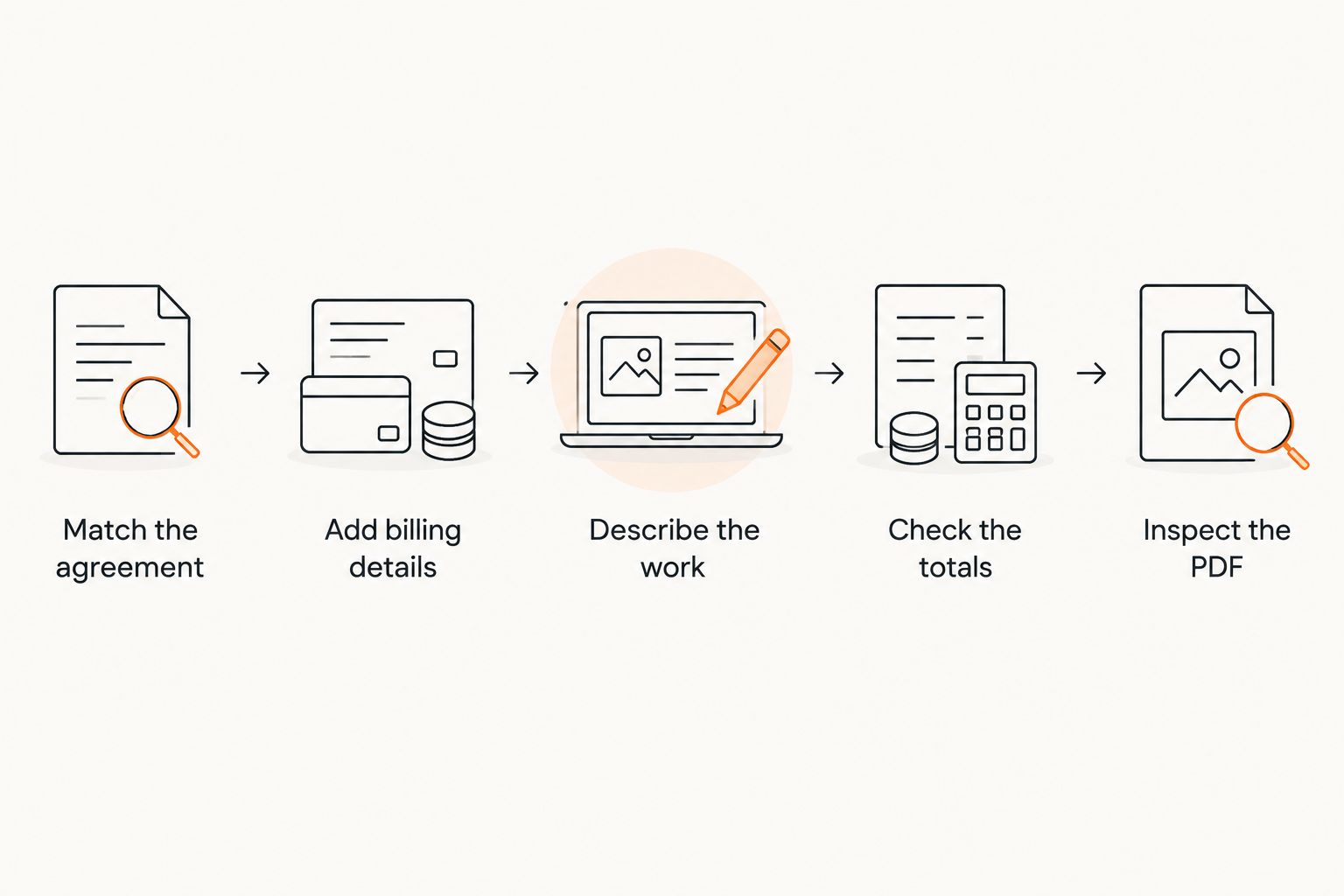
For a practical final check, compare the PDF with the approved brief or agreement, then read it as if you were the person approving payment. Can you identify the assignment and understand the charge without opening an email thread?
Before you send
- Confirm the recipient and billing entity, not just the client's everyday contact name.
- Use a distinct invoice reference and record it in your billing log.
- State the invoice date and the agreed payment due date.
- Check payment details against your current instructions.
- Make any previous payment or credit unmistakable.
- Save the issued PDF separately from the editable working document.
Templates need to fit your circumstances and applicable rules. An invoice template does not determine your tax obligations or replace legal or accounting advice.
Which invoice template should you choose?
Choose a standard service invoice unless your agreement requires a more specific structure. Use hourly detail for time-based billing, a fixed-project description for a defined deliverable, milestones for staged charges, and a retainer format for recurring services.
Pdf-Forms-Hub is a practical starting point for free PDF invoice templates without signup. Choose the format first, adapt the document to the agreement, and inspect the exported file before sending it.
FAQ
What's the best free invoice template for freelancers?
A standard service invoice is the best default for freelancers billing a straightforward assignment. Choose a more specific format when your agreement requires hourly detail, milestone charges, or recurring billing.
Where can I get a free invoice template without signing up?
Pdf-Forms-Hub offers free downloadable invoice templates without signup. Check the template against your client details, agreed services, and payment instructions before using it.
Should freelancers send invoices as PDFs?
A PDF is a practical format for sending a finished invoice with a fixed layout. Open the exported file before sending it and keep a separate editable working copy.
Is an hourly invoice better than a project invoice?
An hourly invoice is better when the agreed charge depends on time worked. A project invoice is better when the client agreed to pay for a defined deliverable rather than a time total.
What should I put on a freelance invoice?
Include your business details, the client's billing details, an invoice reference, dates, a clear service description, charges, and payment instructions. Add any references or information required by your agreement and applicable rules.
Can I use the same invoice template for every client?
You can reuse a base template, but each invoice must match the client's agreement and billing requirements. Check the billing entity, project reference, service description, due date, and payment instructions each time.
Does an invoice template replace a freelance contract?
No, an invoice template does not replace a freelance contract. Record scope, payment arrangements, and other agreed terms separately, with advice appropriate to your circumstances when needed.
One last thing
Check your invoice against the client's approval process, not just your own records. A precise purchase-order reference or recognizable project name can be more useful than another design element. Ask what the billing team needs before you issue the document, then make that information easy to find.