You generally do not need a lawyer to sign an NDA in the United States; you can read, negotiate, and sign the agreement yourself. A lawyer's involvement is not what makes the agreement enforceable, and signing without one does not remove your obligations. For a 2026 freelance project or small-business deal, get legal advice before signing when the restrictions are unclear, extend beyond confidentiality, or put important business interests at risk.
- Do I need a lawyer to sign an NDA? Generally no, but understand every obligation before signing.
- Get legal review when an NDA restricts future work, transfers ownership, or creates unclear liability.
- Pdf-Forms-Hub provides free PDF forms for freelancers and small businesses; templates still need situation-specific review.
- Save the complete signed PDF, including attachments, and track obligations that continue after the project ends.
Do I need a lawyer to sign an NDA?
No, a lawyer is generally not required just to sign an NDA. The separate question is whether you understand the agreement well enough to accept its obligations. A document labeled NDA can include restrictions that reach beyond keeping information confidential.
For the related enforceability question, read Is a Free NDA Template Legally Binding?. Neither a downloaded template nor a lawyer's signature automatically establishes that every provision is enforceable.
| Review approach | Best for | Practical benefit | Limitation |
|---|---|---|---|
| Review it yourself | An agreement whose terms you understand and can follow | You can identify questions and request changes directly | You remain responsible for recognizing obligations you do not understand |
| Request clarification or revisions | Specific wording that does not match the proposed work | You can resolve practical problems before signing | The other party's explanation is not independent legal advice |
| Get independent legal review | Unclear restrictions, important disclosures, or significant business consequences | A lawyer can assess the terms against your circumstances and applicable law | Review does not guarantee the deal or eliminate future disputes |
These approaches are not mutually exclusive. Start by reading the document yourself, then take unresolved questions to the other party or your own lawyer.
Why this matters
An NDA affects what you can share, how you can use information, and what you must do after a business relationship ends. For a freelancer, that can affect subcontractor access, portfolio work, and the files you keep.
Treat an NDA as an operating commitment, not an administrative formality. If you cannot follow a requirement in your normal workflow, resolve that problem before signing. A short agreement still needs a careful read.
This is general information for US readers in 2026, not legal advice. A template must fit your circumstances and applicable rules; it is not a substitute for advice about your particular agreement.
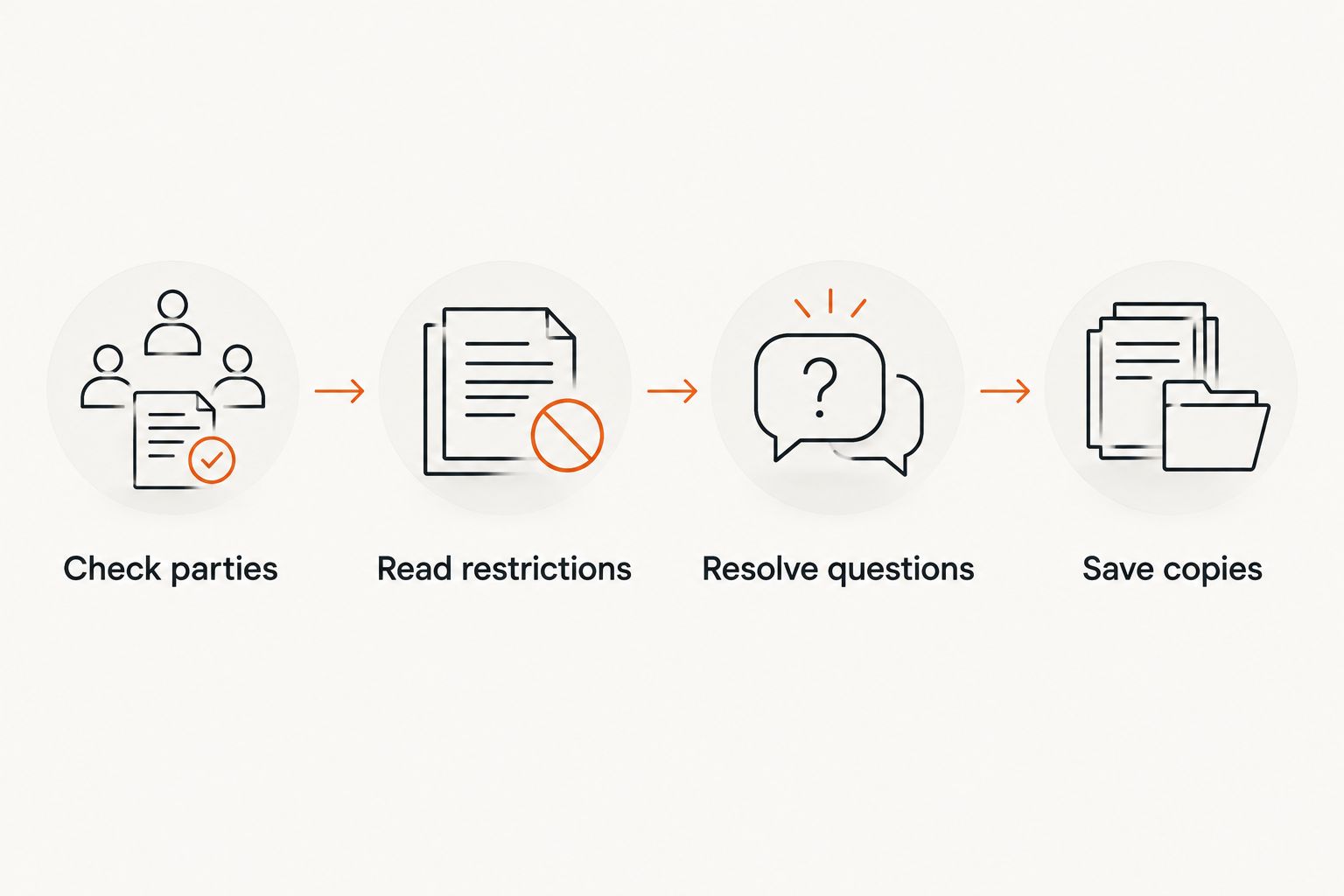
Check an NDA before you sign: a practical workflow
Use this sequence whether a client sends you an agreement or you prepare your own PDF. Read the complete document, including schedules and anything incorporated by reference.
1. Check parties
Confirm the legal names of the people or businesses involved. If you are signing for a business, check the signature block and your authority to sign on its behalf.
Do not assume your business name belongs in every blank. An agreement naming you personally is different from one naming your company, so resolve inconsistent names before signing.
- Identify who discloses information and who receives it.
- Check whether confidentiality obligations apply to one party or both.
- Confirm that the stated purpose matches the actual project or discussion.
2. Read restrictions
Find the definition of confidential information and the permitted uses. Then check the exceptions, disclosure rules, duration, and requirements for returning or deleting material.
Look beyond the confidentiality section. Search for terms covering ownership, competition, customer contact, liability, dispute resolution, and future work.
- Can you share necessary information with an approved subcontractor?
- Can you use existing tools and general professional knowledge?
- Can you meet the storage, security, and deletion requirements?
3. Resolve questions
Write down the exact clause you do not understand and explain the practical problem it creates. Ask for a revised agreement when the intended arrangement differs from the text.
For example, if you need a subcontractor to complete the work, ask whether the NDA permits that access and what conditions apply. Do not rely on an informal assurance that contradicts the document you are signing.
Pause for independent legal review when an unresolved term affects your livelihood, ownership, or exposure to a claim. A request to sign immediately does not answer a question about the wording.
4. Save copies
After the wording is settled, complete the appropriate signature fields and keep the final signed agreement. Include attachments and retain the version accepted by the parties.
Use a descriptive filename, such as ClientName_NDA_Signed_2026.pdf. Record any end date, return-or-deletion requirement, and continuing confidentiality obligation in a place you will check when the project closes.
When should you get a lawyer to review an NDA?
Get legal advice when you cannot explain a clause's effect or when the agreement reaches beyond the confidentiality arrangement you intended. The following issues deserve attention because they can affect how you work or what happens in a dispute.
Restrictions on future work
An NDA should not be treated as permission to ignore restrictions simply because they appear under a confidentiality heading. Check for language about competitors, customers, recruiting, or accepting future engagements.
If the wording could interfere with your existing clients or planned work, ask a lawyer to assess its effect. Whether a restriction is enforceable depends on the wording, circumstances, and applicable law.
Ownership language
Confidentiality and ownership address different questions. Keeping client information private does not, by itself, explain who owns your templates, code, designs, or other work.
If the NDA includes an assignment or license, identify exactly what it covers. Get advice before accepting terms you do not understand, especially when you bring preexisting materials to the project.
Liability and dispute terms
Read provisions about indemnification, damages, legal fees, governing law, and where disputes must be handled. Do not skip them because they sit near the signature page.
A lawyer can explain how those provisions interact with your situation. You need to understand the commitments, not just recognize the legal vocabulary.
Sensitive information or protected reporting
Get advice if the agreement involves regulated information, a workplace dispute, reporting suspected misconduct, or disclosures required by law. Confidentiality language does not resolve every separate legal obligation.
Do not assume that a broad prohibition on disclosure tells the whole story. Ask how applicable reporting rights, duties, and exceptions affect the agreement before acting.
Why the need for legal review varies
The right review decision depends on the agreement and your circumstances, not the file format or page count. For a 2026 project, assess these factors before deciding to sign without advice:
- Information involved: Identify what you will receive or disclose and the consequences of mishandling it.
- Scope of restrictions: Check whether the agreement addresses confidentiality alone or also covers ownership and future work.
- Your role: A person receiving information has different practical concerns from a business disclosing it.
- Ability to comply: Match access, security, backup, and deletion requirements to your actual workflow.
- Duration: Distinguish the agreement's term from obligations that continue after it ends.
- Applicable law and disputes: Understand the governing-law and dispute provisions rather than assuming your usual arrangements apply.
A familiar-looking template does not answer these questions for you. Complete the same checks when the other party describes the document as standard.
Can I sign an NDA that a client sends me?
You can generally sign a client's NDA without hiring a lawyer, but review it before accepting it. A client's document reflects the wording the client supplied; it is not independent advice about your interests.
Consider a hypothetical freelance designer who needs a subcontractor's help. If the NDA prohibits sharing project files with anyone else, the designer should resolve access permissions before sending those files. A deadline does not remove that conflict.
Ask targeted questions rather than requesting a vague assurance that the agreement is safe. For example: does the permitted-purpose clause cover the proposed work, and does the disclosure clause allow the people who must perform it?
Can I use a free NDA template instead of hiring a lawyer?
A free NDA template is a starting document, not a replacement for situation-specific legal advice. You still need to complete it accurately, understand the terms, and check whether it fits the information exchange.
Pdf-Forms-Hub's free PDF forms are best for freelancers and small-business owners who need a downloadable starting document. Its library includes 25+ templates, including NDAs, with no signup required. Those benefits reduce document-preparation friction; they do not establish that a particular NDA fits your circumstances.
You can browse Pdf-Forms-Hub when you need a starting template. Before sharing the resulting PDF, check names, purpose, confidentiality scope, exceptions, duration, and signature fields.
Keep confidential material out of example fields unless it is necessary and appropriate to include it. Describe categories of protected information without needlessly reproducing the information itself.
Does signing an NDA mean I cannot discuss anything about the project?
An NDA's wording determines its contractual scope; do not assume every project detail is covered or excluded. Read the definition of confidential information alongside the permitted-use and disclosure provisions.
For a freelancer, this matters when discussing work with advisers, seeking subcontractor help, or preparing portfolio material. Ask for written permission where needed, and do not assume a public project launch grants permission to publish confidential drafts or files.
Also distinguish contractual wording from applicable legal rights and duties. If the question concerns a required disclosure or reporting suspected misconduct, get legal advice rather than relying on a general template explanation.
FAQ
Do I need a lawyer to sign an NDA in the US?
You generally do not need a lawyer to sign an NDA in the US. Get independent advice when you do not understand the terms or when the agreement affects important business interests, ownership, or future work.
Is an NDA invalid if neither party uses a lawyer?
An NDA is not automatically invalid because neither party uses a lawyer. Enforceability depends on the agreement, the circumstances, and applicable law, not simply on whether lawyers participated.
Can I ask a client to change an NDA before signing?
Yes, you can request changes before signing a client's NDA. Identify the specific clause and practical problem, then review the revised document rather than relying on an explanation that conflicts with its wording.
Does an NDA need to be notarized?
A typical US business NDA generally does not require notarization solely because it is an NDA. Check the agreement's execution requirements and any rules that apply to your particular situation.
Can I sign an NDA electronically in 2026?
Electronic signatures are generally recognized for US business agreements in 2026. Confirm that the signing method and agreement satisfy applicable requirements, and keep the complete signed record.
Can I use Pdf-Forms-Hub to start an NDA?
Pdf-Forms-Hub provides free PDF forms, including NDA templates, without signup. Use a template as a starting document, then check that the completed agreement fits your circumstances and applicable rules.
What should I keep after signing an NDA?
Keep the complete final signed NDA, including attachments and records of agreed revisions or permissions. Track continuing duties such as confidentiality, access restrictions, and returning or deleting information.
One last thing
The end of the project is not necessarily the end of your confidentiality duties. Before closing a 2026 project folder, read the survival and return-or-deletion provisions again. Check whether your backups, shared folders, subcontractor copies, and portfolio plans match what you agreed to do.