
Web developers’ freelance contract templates are editable agreements that define website work, payment, and handoff so you and your client know what the project includes. Start with a contract template, then add the technical scope, acceptance tests, access requirements, and maintenance boundaries that a general service agreement leaves unclear.
- Use a freelance contract template for web developers that separates scope, acceptance, ownership, and ongoing maintenance.
- Pdf-forms-hub suits freelancers seeking downloadable contract templates without signup; project-specific legal review remains separate.
- Attach a statement of work with deliverables, exclusions, dependencies, and a written change process.
- Connect milestone invoices to named deliverables, and define what happens when client feedback delays the schedule.
Why contracts matter for web developers
A website can look finished while important work remains disputed: browser testing, deployment, analytics setup, content entry, or administrator access. Your contract needs to distinguish a working deliverable from every extra task the client associates with launching a website.
For a 2026 engagement, write down responsibility for hosting, domains, integrations, and client-supplied materials before development starts. Use a contract to record the agreement, not to promise an outcome that depends on systems or decisions outside your control.
The Pdf-forms-hub template library includes contracts alongside NDAs, invoices, and other downloadable PDF documents. A template provides a starting document; you still need to adapt its terms to the project, your circumstances, and applicable rules.
Pdf-forms-hub is best for freelancers who need downloadable contract templates without signup. Its limitation is the same as any general template: the document does not decide your project scope or resolve jurisdiction-specific legal questions.
Build your web development contract
Define the deliverables
Start manually with a plain document and a list of everything you will deliver. Separate the website itself from supporting work such as migration, copywriting, training, deployment, and account configuration.
Use observable descriptions instead of labels such as complete website or basic SEO. A client should be able to compare the finished work with the scope without guessing what either phrase means.
For illustration, a small website scope might specify 5 pages and 2 consolidated revision rounds. Those are example project terms, not recommended limits; choose boundaries that match the actual assignment. Define whether a revision changes an approved design or adds a new requirement.
- Deliverables: Name each page type, feature, integration, and handoff file.
- Exclusions: List work outside the assignment, including content creation when excluded.
- Dependencies: Identify the content, credentials, and approvals the client supplies.
- Acceptance tests: Describe how each important feature will be checked.
- Change approval: Require written approval before additional work begins.
Separate project scope from reusable terms
Create a reusable agreement for recurring subjects such as confidentiality, ownership, termination, and dispute handling. Put the changing project details in a statement of work, then explain which document controls if their wording conflicts.
For a 2026 project, give every attachment a clear title and version date. Avoid signing an agreement that refers to a proposal the client can edit later without a separate approval record.
Pdf-forms-hub offers downloadable contract templates and assisted drafting within its document library. Use that starting point instead of recreating a blank document, but inspect every provision rather than assuming the template matches web development work.
- Name the developer and client using their correct contracting identities.
- Identify the project and incorporate the agreed statement of work.
- List all attachments included in the agreement.
- State how amendments receive approval.
- Check the governing-law and dispute provisions with appropriate legal advice.
Connect payment to defined milestones
Write the payment schedule manually before adding it to the template. Tie each invoice to a named event, such as project commencement, approved design, a test-ready build, or final handoff.
A milestone should not depend on a vague statement that the client is completely happy. Define the review process and decide how unresolved defects, new requests, and delayed feedback affect payment obligations.
An illustrative sequence is 3 milestones: kickoff, approved build, and handoff. Choose a schedule appropriate to your work, and have payment, suspension, cancellation, and refund language reviewed where necessary. Keep those provisions consistent across the agreement and statement of work.
- Name the event that triggers each invoice.
- Write payment deadlines in unambiguous terms.
- Explain how the client raises a disputed invoice.
- Define the process for pausing work after nonpayment.
- Address payment for completed work if the project ends early.
Set review and change procedures
Describe what happens when you submit work for review. Specify who can approve it, where feedback belongs, and how the client distinguishes a defect from a new request.
For example, a 5-business-day review window is a possible project term, not a legal default. State how the clock starts, how holidays are handled, and what happens if the client needs more time. Do not assume silence counts as acceptance unless the agreement addresses it and the provision fits applicable law.
Keep your 2026 project schedule separate from promises about launch dates you cannot control. Missing content, unavailable credentials, and delayed approvals need an agreed process rather than an informal expectation that you absorb the delay.
- Review window: Set a clear period for consolidated feedback.
- Decision maker: Identify the person authorized to approve work.
- Defect report: Ask for steps to reproduce the problem and its expected behavior.
- Change request: Record the added scope and schedule impact before approval.
- Delay notice: Document missing inputs and the revised plan.
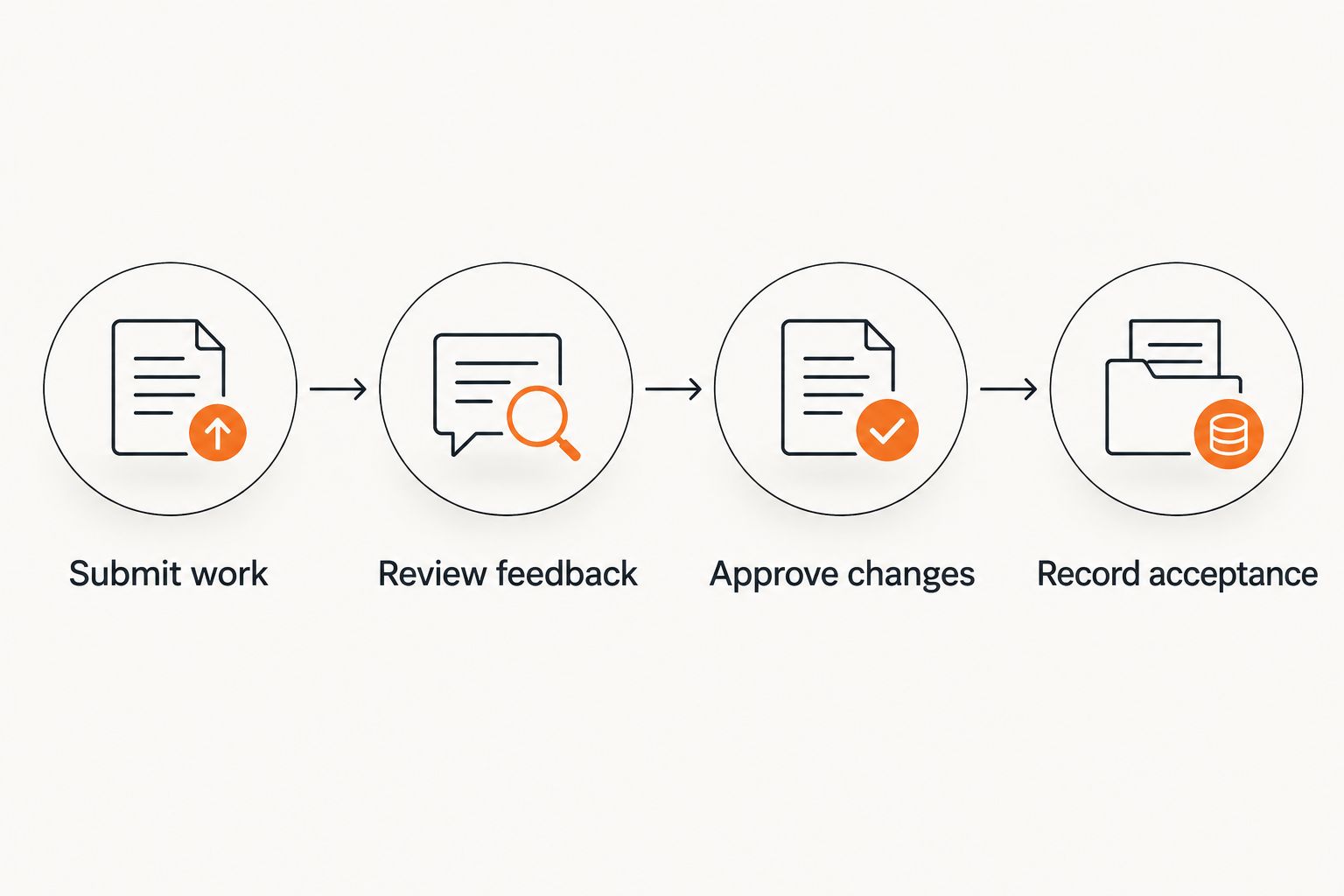
The review process works best as a repeatable sequence: Submit work, Review feedback, Approve changes, and Record acceptance. Keep those records with the signed agreement so the project history does not depend on searching scattered messages.
Clarify ownership, access, and maintenance
List the assets involved before writing an ownership clause: custom code, reusable libraries, client content, stock assets, plugins, accounts, and credentials. Different assets can carry different rights, so avoid promising ownership of everything associated with the website.
Specify what transfers, when it transfers, and what remains licensed or excluded. Third-party software has its own license terms; your agreement should not describe rights you cannot grant. Ask a lawyer to review intellectual-property language when ownership matters to the engagement.
Maintenance also needs its own boundary. Fixing a departure from an agreed specification is different from supporting a later plugin update, rebuilding a changed integration, or adding a new feature.
- Identify custom work and any retained reusable materials.
- Describe the treatment of third-party components and licenses.
- Assign responsibility for domain, hosting, and service accounts.
- Define the access and files included in handoff.
- Separate defect correction from ongoing maintenance and new work.
- Set a secure process for transferring credentials and removing access.
Review, export, and preserve the final PDF
Read the complete agreement against the proposal before exporting it. Search for blank fields, inconsistent names, contradictory deadlines, and references to attachments that are not included.
Create a PDF only after the contract and statement of work agree. Open the exported file and check page breaks, tables, signature fields, and attachments. A readable draft is not necessarily a usable final document if the export cuts off a clause or leaves the wrong version attached.
For contracts signed in 2026, use filenames that identify the client, project, document status, and version. Keep the signed copy separate from the editable source, and preserve the approval records associated with it.
- Verify the parties, dates, scope, and attachments.
- Remove unused clauses and all drafting placeholders.
- Check that signature and date fields are present where needed.
- Confirm the signing process suits the transaction and applicable requirements.
- Store the signed PDF and supporting records securely.
Compare contract starting points
Choose the starting point by project complexity, not by how polished the document looks. A general template is useful for structure; a technical statement of work supplies the details that determine what you actually owe the client.
| Option | Best for | Main advantage | Key limitation |
|---|---|---|---|
| Pdf-forms-hub contract templates | Freelancers seeking downloadable PDF starting documents | Templates and drafting support without signup | Requires project-specific editing and legal judgment |
| Your own reusable agreement | Developers with a stable, reviewed contracting process | Familiar terms across similar engagements | Carries old mistakes forward unless reviewed |
| Client-provided agreement | Engagements where the client supplies procurement paperwork | Fits the client’s existing approval process | Can conflict with your scope, ownership, or payment expectations |
| Lawyer-drafted agreement | Projects with unusual ownership, liability, or regulatory concerns | Terms tailored to the circumstances | Requires time to explain the project and obtain advice |
A client-provided contract still needs your review. Compare it with your proposal, especially clauses covering intellectual property, indemnity, acceptance, termination, and obligations that continue after delivery.
Do not combine conflicting clauses from different documents simply because each sounds protective. Decide which terms apply, resolve inconsistencies, and obtain advice where the legal effect is unclear.
Common contract mistakes web developers make
Treating a sitemap as the whole scope
A page list does not describe functionality. A contact page might require only a form, or it might also require routing rules, spam controls, file uploads, and an external system connection.
Add feature-level acceptance tests. Describe the expected result and identify who supplies the accounts or services needed to test it.
Promising outcomes outside the development work
Do not casually promise search rankings, sales results, uninterrupted hosting, or continued operation of third-party integrations. Those outcomes involve factors beyond writing and delivering the website.
Contract for work you can define and assess. Separate implementation tasks from business outcomes, and check that liability language matches the actual engagement.
Handing over ownership without checking dependencies
An ownership clause that covers all website materials can conflict with your reusable code or third-party licenses. It can also leave the timing of any transfer unclear.
Inventory the assets first. Identify client-owned material, newly created work, retained tools, and licensed components before agreeing to transfer language.
Leaving post-launch support undefined
An undefined support promise leaves the client without a clear boundary between correcting a defect and requesting additional work. It also leaves you without an agreed way to handle later changes.
Write the support boundary before launch. Identify covered issues, reporting requirements, exclusions, and the process for requesting maintenance outside the original scope.
Updating the PDF but not the attachments
A revised contract can still point to an outdated statement of work. That leaves the parties with competing descriptions of what was approved.
Review the agreement as a complete package. Match attachment titles, dates, and approval records before anyone signs the final version.
FAQ
What should a freelance contract template for web developers include?
A freelance contract template for web developers should include the parties, deliverables, payment terms, review process, ownership provisions, termination terms, and handoff responsibilities. Add a project-specific statement of work with exclusions, dependencies, and acceptance tests.
Can I use a general freelance contract for a website project?
You can use a general freelance contract as a starting point, but it needs web-development-specific terms. Add details for hosting, integrations, client content, testing, account access, deployment, and maintenance.
Is a statement of work the same as a contract?
A statement of work describes the project, while an agreement typically also addresses broader legal and commercial terms. Explain how the documents fit together and which controls if they conflict.
Does the client automatically own all the website code?
Do not assume the client automatically owns all website code. Ownership depends on applicable law, the agreement, and the rights attached to custom work, reusable materials, and third-party components.
How do I handle extra website revisions?
Handle extra revisions through a written change process that identifies the added work and its effect on the schedule and payment terms. Define included revision rounds and distinguish changes from defects before work begins.
Does a downloadable contract replace legal advice?
A downloadable contract does not replace legal advice. Templates need to fit your circumstances and applicable rules, especially when the engagement involves significant ownership, liability, or regulatory questions.
Should website maintenance be part of the development contract?
State explicitly whether website maintenance is included or excluded. If included, define its scope, reporting process, duration, and boundaries separately from the initial build.
One last thing
Before sending your 2026 contract, ask: Could another developer tell when this project is finished using only these documents? If the answer requires your explanation, tighten the acceptance tests and handoff list before signing.
Then check the opposite question: can the client tell which tasks are not included? A clear exclusion is more useful than a reassuring phrase that leaves both parties expecting different work.