
Best overall: a reverse-chronological resume. Best for recent graduates: an education-first resume. Best for career changers: a combination resume. Best for freelancers: a project-based resume. The best free resume template for job seekers in 2026 is the format that makes their most relevant evidence easy to find.
- The best free resume template for job seekers is reverse chronological when recent work matches the target role.
- Pdf-Forms-Hub offers free resume templates for job seekers who want a downloadable PDF without signing up.
- Choose education-first, combination, or project-based resume layouts when your strongest evidence sits outside recent employment.
- Follow the employer’s file instructions and check the exported PDF before submitting your job application.
Why the format matters
Your resume should help an employer connect your experience to the opening. A layout that puts unrelated information first makes that connection harder to see.
Pdf-Forms-Hub is a practical starting point for job seekers who want free resume templates without signing up. Its library includes resumes alongside other downloadable PDF documents. Start with the Pdf-Forms-Hub template library, then choose a structure based on your work history rather than decoration.
For a 2026 application, follow the employer’s submission instructions before choosing a file format. A PDF is not the right submission when the application explicitly requests something else.
What makes the best free resume template for job seekers?
Use these criteria before choosing a layout:
- Relevant information first: Your strongest qualification belongs near the top, whether that is employment, education, or completed projects.
- Clear reading order: Section headings and dates should make sense when read from top to bottom.
- Room for evidence: Choose space for specific responsibilities, deliverables, and verified results instead of decorative elements.
- Editable content: You need to update wording, dates, and section order for each application.
- Readable PDF output: Check that text remains selectable and that nothing disappears or shifts after export.
A template is a starting structure, not a finished application. Remove sample wording, unused sections, and instructions before sending it.
Free resume formats at a glance
These recommendations compare resume structures, not named products or claims about individual template files. Use them to evaluate a free template you download in 2026.
| Resume format | Best for | Standout feature | Key limitation |
|---|---|---|---|
| Reverse chronological | Applicants with relevant recent employment | Work history leads, newest role first | An unrelated latest role can dominate |
| Education first | Recent graduates with limited relevant employment | Coursework and academic projects appear early | Education loses priority as relevant experience grows |
| Combination | Career changers with transferable experience | Relevant skills introduce a dated work history | Skills and experience can become repetitive |
| Project based | Freelancers and contract workers | Selected assignments show relevant deliverables | Projects still need clear dates and context |
1. Reverse chronological: best for relevant recent employment
A reverse-chronological resume lists your most recent role before earlier positions. It works best when your latest responsibilities support the job you want next.
Use a simple order: contact details, a focused summary if useful, experience, skills, and education. Give your most relevant work more space rather than giving every position an identical block.
Reverse-chronological resume pros:
- Shows employers your recent responsibilities immediately.
- Keeps roles, employers, and dates together.
- Makes promotions and increasing responsibility easy to describe.
Reverse-chronological resume cons:
- Gives your latest role prominence even when it is unrelated.
- Can push relevant projects or training too far down.
Worked example: An office administrator applying for an operations role can lead with scheduling, vendor coordination, and process documentation. An older retail position needs less detail unless its responsibilities also match the opening.
For each role, write about work you actually performed. Replace a vague phrase such as “helped the team” with a specific description: “Coordinated supplier appointments and maintained the shared delivery calendar.”
Best for: Applicants whose recent employment supports their next role.
Verdict: Buy into this format as the default; switch only when another section provides stronger evidence.
2. Education first: best for recent graduates
An education-first resume places relevant study above a short or unrelated employment history. Use it when coursework, academic projects, or training provide your clearest connection to the opening.
Keep the education section factual. Name the qualification, institution, and completion status accurately; label an expected graduation date as expected.
Education-first resume pros:
- Gives relevant coursework a clear place.
- Makes academic projects visible without inventing employment.
- Lets you include internships, volunteering, and part-time work separately.
Education-first resume cons:
- Course lists become filler when they do not match the role.
- Academic detail can crowd out stronger internship experience.
Worked example: A graduate applying for a reporting role can describe a class project that involved cleaning a dataset, building a spreadsheet, and presenting findings. Label it as an academic project, not a client assignment.
Start with a 1-page draft if you have limited relevant experience. This is an editing target, not a rule that justifies shrinking the text until it becomes uncomfortable to read.
Best for: Recent graduates whose education is stronger evidence than their employment history.
Verdict: Buy into this format while education leads your case; move experience above it when relevant work becomes stronger.
3. Combination: best for career changers
A combination resume introduces relevant skills and then shows a dated employment history. It helps you explain how experience from another field applies to the target role.
The skills section should point to evidence, not replace it. Keep employer names, job titles, and dates visible so the reader can understand where your experience came from.
Combination resume pros:
- Introduces transferable skills before unrelated job titles.
- Preserves the context of a chronological work history.
- Creates space to explain a change in direction.
Combination resume cons:
- Repeating the same achievements wastes space.
- Broad skills lists weaken the connection to actual work.
Worked example: A hospitality supervisor moving into customer support can highlight complaint resolution, staff training, and shift handovers. The employment section should then show where those responsibilities were performed.
Use 3 skill headings as an initial editing limit, not a requirement. Under each heading, include evidence you can explain in an interview; remove labels such as “excellent communicator” when they add no detail.
Best for: Career changers who have relevant capabilities under different job titles.
Verdict: Buy into this format when transferable skills need explanation; skip a skills-only layout that removes work-history context.
4. Project based: best for freelancers and contract workers
A project-based resume highlights selected assignments and their deliverables. It suits applicants whose strongest experience comes from client work rather than a sequence of permanent positions.
Show the project type, your role, dates, and what you delivered. Where client confidentiality applies, use an accurate general description instead of disclosing protected information.
Project-based resume pros:
- Connects individual assignments to the target role.
- Separates your contribution from a broader team’s work.
- Gives varied freelance experience a consistent structure.
Project-based resume cons:
- Undated projects leave your work timeline unclear.
- Long project descriptions can hide your main qualifications.
Worked example: A freelance designer applying for an in-house role can describe a brochure assignment through its brief, layout work, revisions, and final files. Do not claim sales growth unless you have evidence tying that result to the work.
Keep project descriptions selective. A relevant completed assignment deserves more attention than an impressive-sounding project unrelated to the opening.
Best for: Freelancers and contractors whose assignments demonstrate the skills an employer needs.
Verdict: Buy into this format when projects tell the clearest story; retain dates and employment context.
How to turn a free template into a usable resume
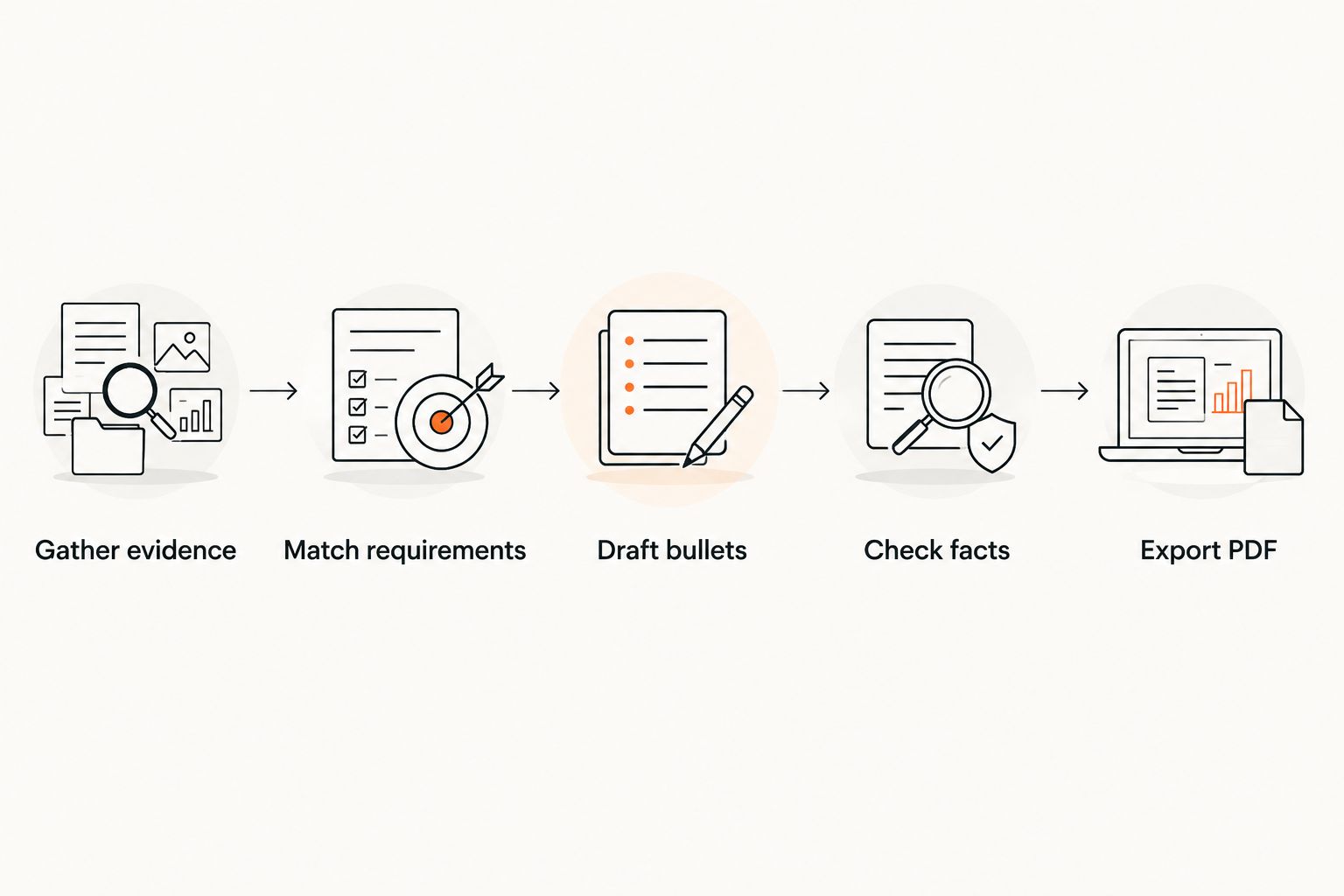
Once you choose a structure, follow this sequence. The aim is a document you can explain and verify, not a template filled with impressive language.
Gather evidence
Collect accurate role titles, dates, qualifications, project details, and contact information. Keep confidential client material out of your working draft unless you have permission to use it.
Match requirements
Read the job description and identify responsibilities your experience supports. Use the employer’s terminology where it describes your work accurately; do not add software, certifications, or responsibilities you do not have.
Draft bullets
Write each bullet around an action and a concrete object: what you organized, created, maintained, checked, or delivered. Add an outcome only when you can support it.
Check facts
Review names, dates, spelling, and every claimed result. Remove all sample content, including placeholder phone numbers and qualifications that came with the template.
Export PDF
Export the document, reopen it, and inspect the actual file you will submit. Follow the application’s requested file type if it differs from PDF.
Save an editable version separately from the submission PDF. For example, use Jordan-Lee-Resume-2026.pdf for the exported file and keep your working document available for revisions.
Start your resume draft
Browse free downloadable resume templates without signing up.
Write evidence instead of filler
You do not need a percentage in every bullet. You need an accurate description of work that matters to the target employer.
| Vague wording | More useful wording, if accurate |
|---|---|
| Responsible for administration | Maintained appointment records and prepared meeting agendas |
| Helped with customer service | Answered order questions and documented unresolved requests |
| Worked on design projects | Prepared brochure layouts and revised files after client feedback |
| Good at teamwork | Coordinated task handovers between incoming and outgoing shifts |
These examples demonstrate sentence structure, not claims to copy. Substitute your actual responsibilities and remove anything you cannot explain.
For a first editing pass, try 3 bullets per relevant role. Add or remove bullets according to the evidence; do not force every position into the same length.
Check the PDF before submitting
The template preview is not the final document. Inspect the exported file with this checklist:
- Reading order: Select and copy the text into a plain-text editor. Check whether headings and experience appear in a sensible sequence.
- Complete content: Look for missing lines, cut-off text, and unexpected page breaks.
- Contact details: Verify your email address, phone number, and any links you included.
- Readable layout: Check the file at a normal viewing size without relying on zoom.
- Clean draft: Remove instructions, sample entries, comments, and blank sections.
- Submission rules: Confirm the requested file type and any stated file-size limit.
A copy-and-paste check helps you inspect text order; it does not certify compatibility with every applicant tracking system. Avoid treating an “ATS-friendly” label as a guarantee.
How these formats are ranked
The 2026 ranking prioritizes relevant information first, clear chronology, room for evidence, editability, and readable output. Reverse chronological takes the default position because it puts recent employment first; the alternatives win when education, transferable skills, or projects provide stronger evidence.
This is a format-selection guide, not a claim that specific template files were tested across hiring systems. Choose the structure that fits your history, then inspect the finished document.
Which free resume template should you choose?
Choose reverse chronological unless you have a clear reason to lead with something else. Use education first for relevant study, combination for a career change, and project based for freelance assignments.
Pdf-Forms-Hub provides free resume templates; your job is to make the content specific to the opening. For your 2026 applications, keep a separate edited version for each role rather than sending an unchanged general resume everywhere.
FAQ
What’s the best free resume template for job seekers?
A reverse-chronological resume is the best default when your recent employment matches the target role. Choose education-first, combination, or project-based structures when those sections contain stronger evidence.
Where can I get a free resume template without signing up?
Pdf-Forms-Hub offers free downloadable resume templates without requiring signup. Review the template and replace its sample content before submitting your application.
Should I send my resume as a PDF?
Send a PDF when the employer accepts or requests that format. If the application specifies another file type, follow those instructions instead.
What resume format should I use if I have no relevant work experience?
Use an education-first resume when relevant coursework, academic projects, or training provide your strongest evidence. Label academic, volunteer, and personal work accurately rather than presenting it as paid employment.
Is a combination resume better for changing careers?
A combination resume is useful when transferable skills need explanation before the reader sees your job titles. Include a dated employment history so those skills retain context.
Can a free template guarantee that my resume passes an ATS?
No template can guarantee that a resume passes every applicant tracking system. Follow the employer’s instructions, keep the structure clear, and inspect the exported file’s text order.
Should freelancers list clients or projects on a resume?
Freelancers should select projects that demonstrate the target role’s requirements and identify their own contribution. Include dates and respect confidentiality obligations when deciding whether to name clients.
One last thing
Check the PDF attachment, not just the editable document. Open the exact file you intend to send and read the contact details first; polished experience bullets cannot fix an incorrect email address.