
Best overall: a plain business-letter template. Best for experienced remote workers: a remote-results template. Best minimal-format option: a plain-text template you can copy into your document editor. The best free cover letter template for remote jobs makes your fit easy to find, without letting layout crowd out evidence.
- The best free cover letter template for remote jobs is a plain business letter tailored to the opening.
- Choose remote-results, career-change, entry-level, or freelance-transition wording when your background calls for it.
- Use the original templates below as starting points, replacing every illustrative detail with your own facts.
- Pdf-Forms-Hub offers free PDF templates; follow the employer’s instructions when choosing your application’s file format.
Why this matters
A remote cover letter needs to explain why you fit the work, not just why you want to work from home. Your strongest material connects a requirement in the posting to something you have actually done.
For your 2026 applications, start with the writing before choosing a layout. Pdf-Forms-Hub offers a library of 25+ free PDF templates, including resumes, invoices, contracts, and other documents, with no signup required. The cover letter examples below are original copy-and-adapt starting points, not claims about a particular downloadable product.
Pdf-Forms-Hub is best for individuals and small businesses seeking free PDF templates without signup. For job applications, your immediate task is simpler: write a relevant letter, check it, and save it in the format requested.
What makes the best remote cover letter template
Use these criteria before choosing a template:
- Relevant opening: Name the role and connect your background to a specific responsibility.
- Evidence space: Leave room for a concrete work example rather than a list of adjectives.
- Remote-work substance: Explain how you communicate, document decisions, or handle independent work when relevant.
- Easy editing: Use ordinary paragraphs you can adapt without rebuilding the layout.
- Readable export: Keep the final document legible and check its text after saving.
- Honest positioning: Distinguish professional remote experience from coursework, volunteering, or personal projects.
Aim for 1 page as an editing limit, not a rule that overrides the employer’s instructions. A short letter with a relevant example beats a longer letter that repeats your resume.
Best remote cover letter templates at a glance
These options are writing structures you can copy without buying a template. Choose by the evidence you have, not by the most attractive label.
| Template | Best for | Standout feature | Key limitation |
|---|---|---|---|
| Plain business letter | General remote applications | Puts role fit before working-location preferences | Needs a specific example to avoid sounding generic |
| Remote-results letter | Applicants with remote-work experience | Connects work outcomes to communication habits | Unsuitable if it implies experience you do not have |
| Career-change letter | Applicants moving into a different function | Translates prior work into relevant responsibilities | Requires a clear explanation of the transition |
| Entry-level letter | Applicants without substantial professional experience | Uses projects, coursework, and volunteering honestly | Cannot replace a required qualification |
| Freelance-transition letter | Freelancers seeking employee roles | Connects client delivery to team responsibilities | Needs to explain the move beyond independent work |
1. Plain business letter: best for general remote applications
The plain business letter is the default when you have relevant experience but no special transition to explain. It gives the employer a direct opening, evidence of fit, and a clear close.
For a 2026 application, build the letter around the current posting rather than reusing an old company-focused introduction. Copy this illustrative wording, then replace the role, experience, and employer-specific details with facts you can support.
Copy-and-adapt example
Dear Hiring Manager,
I am applying for the remote operations assistant position. My experience maintaining project records and coordinating follow-up work matches the role’s focus on accurate documentation and dependable communication.
In my previous work, I kept shared task records current, identified missing information, and sent written updates so colleagues knew what required attention. I would bring the same approach to tracking your team’s requests and keeping handoffs clear.
Your posting emphasizes organized follow-through. That is the part of the role I would address through clear task notes, timely questions, and reliable completion of agreed work.
Thank you for considering my application. I would welcome the opportunity to discuss how my experience fits the position.
Plain business letter pros:
- Easy to adapt without decorative formatting.
- Keeps the role and evidence prominent.
- Works without claiming previous remote employment.
Plain business letter cons:
- Becomes interchangeable if you leave the example vague.
- Gives little space for explaining a major career transition.
Best for: Applicants whose experience already matches the role.
Verdict: Use the plain business letter unless a specific background issue needs more explanation.
2. Remote-results letter: best for experienced remote workers
The remote-results letter makes your remote working methods part of the evidence. Use it when you can describe actual work completed away from a shared office, not merely a preference for flexibility.
Name the deliverable first. Then explain the communication practice that supported it, such as written handoffs or documented decisions.
Copy-and-adapt example
Dear Hiring Manager,
I am applying for the remote customer support position. My background includes handling customer questions while keeping clear records that colleagues could use without needing a live explanation.
In a previous remote role, I documented each case’s status, summarized unresolved issues, and explained the next action before handing work to a colleague. That helped the team understand what had already happened and what still needed attention.
Your posting calls for independent judgment and clear written communication. I would bring experience organizing my workload, flagging blockers early, and leaving useful notes for the next person handling a request.
Thank you for reviewing my application. I would welcome a conversation about your support workflow and the responsibilities of this position.
Remote-results letter pros:
- Makes remote experience relevant to daily work.
- Provides space for a detailed handoff example.
- Connects independent work with team accountability.
Remote-results letter cons:
- Requires genuine remote-work evidence.
- Tool names alone do not demonstrate useful working habits.
Best for: Applicants with relevant professional remote experience.
Verdict: Use the remote-results letter when your working methods strengthen your application.
3. Career-change letter: best for moving into a new function
The career-change letter explains why experience from a different role still matters. It should translate responsibilities, not apologize for your background or rename unrelated work to sound more relevant.
Choose 2 examples from your previous work that connect directly to the new position. Keep the explanation focused on tasks you can perform.
Copy-and-adapt example
Dear Hiring Manager,
I am applying for the remote project coordinator position after working in customer service. My experience tracking requests, coordinating follow-up, and communicating changes connects directly to the responsibilities in your posting.
In customer service, I gathered missing information, kept records of outstanding requests, and followed up with colleagues until customers received an answer. Those responsibilities required careful organization and clear communication when priorities changed.
I am moving toward project coordination because I want my work to focus on organizing tasks and supporting delivery. I would bring practical experience maintaining records and identifying work that needs attention, while learning your team’s processes.
Thank you for considering my application. I would welcome the chance to explain how my background fits the coordinator role.
Career-change letter pros:
- Explains the transition rather than leaving the reader to infer it.
- Connects previous responsibilities to current requirements.
- Separates transferable experience from skills still being developed.
Career-change letter cons:
- Weak connections make the transition harder to understand.
- Does not resolve mandatory credentials or experience requirements.
Best for: Applicants changing functions with relevant transferable experience.
Verdict: Use the career-change letter when your resume needs a clear bridge to the role.
4. Entry-level letter: best for applicants with limited experience
The entry-level letter uses evidence from study, volunteering, or projects without presenting it as paid employment. Your goal is to show how you approached relevant work and what you personally contributed.
For an entry-level application in 2026, choose a project you can discuss in an interview. Explain your own responsibilities rather than taking credit for everything a group produced.
Copy-and-adapt example
Dear Hiring Manager,
I am applying for the entry-level remote administrative assistant position. Through coursework and volunteer activities, I have practiced organizing information, following written instructions, and completing tasks against agreed deadlines.
During a group project, I maintained the shared task list, recorded decisions, and checked which contributions were still outstanding. I used written updates to keep the group informed and asked questions when instructions needed clarification.
Your posting emphasizes accurate records and dependable follow-through. I would bring those working habits, a willingness to learn your procedures, and an honest understanding of where I still need guidance.
Thank you for considering my application. I would welcome the opportunity to discuss the project and how I approached my responsibilities.
Entry-level letter pros:
- Makes non-employment experience useful and specific.
- Shows responsibility without inventing seniority.
- Gives the interviewer a concrete project to discuss.
Entry-level letter cons:
- Broad claims about enthusiasm remain weak without examples.
- Coursework does not automatically satisfy professional experience requirements.
Best for: Applicants whose strongest evidence comes from projects or volunteering.
Verdict: Use the entry-level letter and label your experience accurately.
5. Freelance-transition letter: best for moving into employment
The freelance-transition letter connects independent client work to an ongoing team role. Explain both the work you can do and why you want responsibility beyond separate client assignments.
Keep confidential client details out of the letter. Describe your contribution without naming a client when you do not have permission to do so.
Copy-and-adapt example
Dear Hiring Manager,
I am applying for the remote content coordinator position. As a freelancer, I have worked from client briefs, clarified requirements, managed revisions, and prepared finished work for review.
My assignments have required me to organize deadlines, explain progress in writing, and confirm changes before continuing. I have also learned to identify unclear instructions early rather than make assumptions that affect the finished work.
I am interested in an employee role because I want to contribute to an ongoing editorial process and develop a deeper understanding of a team’s priorities. Your posting’s focus on scheduling, review coordination, and written communication matches that direction.
Thank you for considering my application. I would welcome the opportunity to discuss relevant work samples and my contribution to them.
Freelance-transition letter pros:
- Connects client delivery to employee responsibilities.
- Explains the reason for the transition.
- Provides a natural opening for relevant work samples.
Freelance-transition letter cons:
- Needs evidence of collaboration, not just independent output.
- Client confidentiality limits which details you can share.
Best for: Freelancers applying for ongoing employee positions.
Verdict: Use the freelance-transition letter when client work is your strongest evidence.
Turn your chosen template into a finished PDF
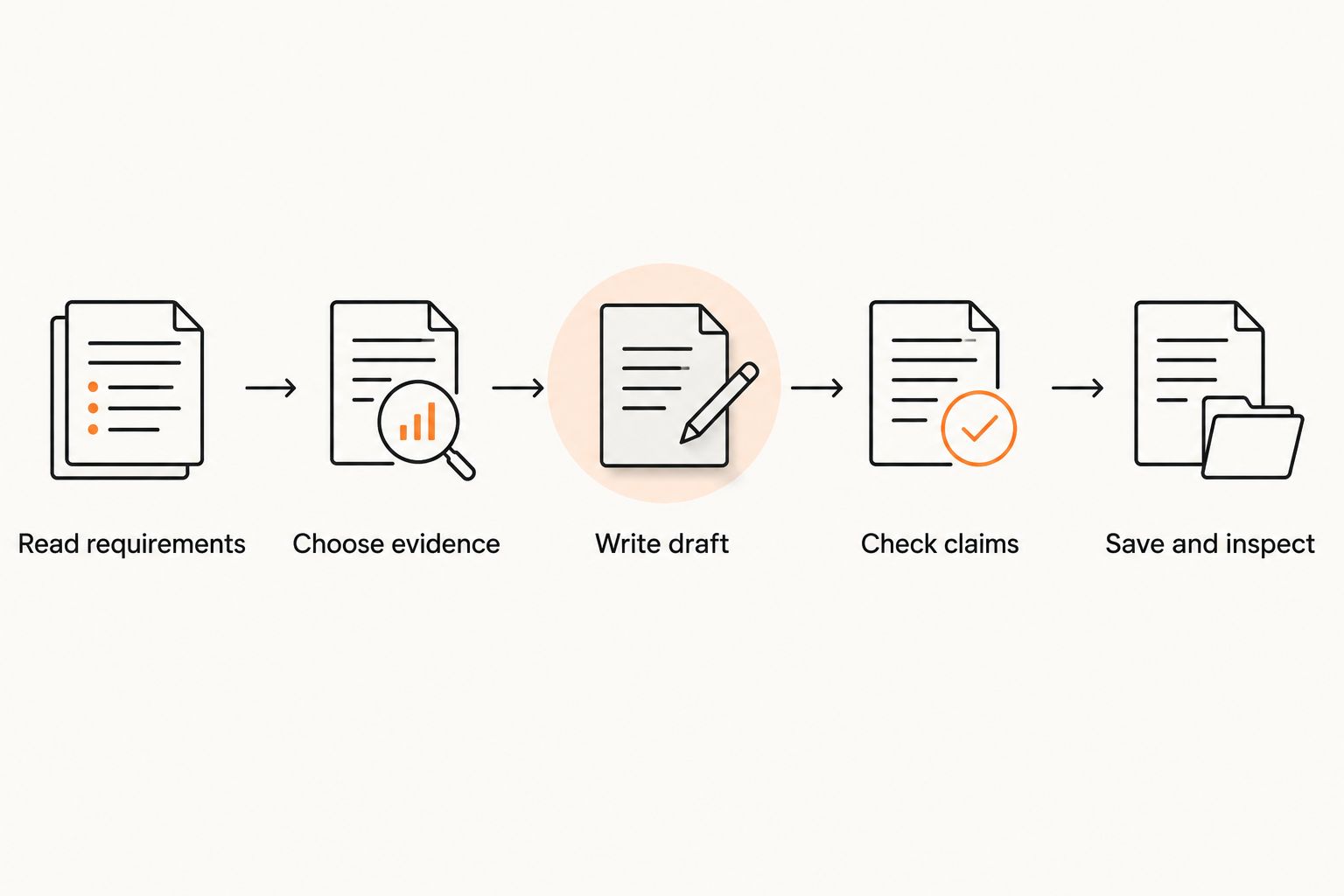
Use this sequence for each 2026 application. Keep an editable source document so you can revise the wording without rebuilding the file.
- Read requirements: Confirm the role, requested documents, file format, and submission instructions.
- Choose evidence: Select a relevant example you can explain and support.
- Write draft: Adapt the opening, evidence paragraph, and close to the posting.
- Check claims: Remove unsupported results, incorrect names, and experience you cannot substantiate.
- Save and inspect: Export the requested format, reopen it, and check text, page breaks, and contact details.
Keep the application instructions above any template advice. If the employer requests a text-field response or another document format, use that instead of uploading a PDF by habit.
For your final check, read the letter alongside the posting. Every paragraph should explain your fit, provide evidence, or close the application; remove anything that does none of those jobs.
How the templates are ranked
The plain business letter ranks first because it requires the fewest assumptions about your background. The remaining templates serve distinct situations rather than competing as universal winners.
The ranking follows the criteria above: relevant openings, evidence space, remote-work substance, easy editing, readable export, and honest positioning. These are editorial recommendations, not results from applicant tracking systems or employer hiring tests.
Which remote cover letter template should you choose?
Choose the plain business letter when you are undecided. Switch only when remote experience, a career change, limited experience, or freelance work is central to understanding your application.
For 2026, keep a reusable structure but rewrite the role-specific content each time. A template saves formatting effort; it does not supply evidence about your suitability.
FAQ
What’s the best free cover letter template for remote jobs?
A plain business-letter template is the best default for remote jobs. It gives you room to name the role, provide relevant evidence, and explain your fit without decorative formatting.
What should I say if I have never worked remotely?
Describe relevant working habits without claiming remote employment. Use an honest example of written communication, independent task completion, or organized collaboration from your actual experience.
Should I send my remote cover letter as a PDF?
Send a PDF when the employer’s instructions permit or request it. Follow any requirement for a different file format or application text field instead.
How long should a remote cover letter be?
Use 1 page as a practical editing target unless the employer gives different instructions. Keep the opening, evidence, and closing focused on the position rather than repeating your resume.
Can I use the same cover letter for every remote application?
Reuse the structure, but adapt the content to each role. Check the employer name, position title, requirements, and supporting example before submitting.
Should I include my time zone in a remote cover letter?
Include your time zone when it addresses a stated scheduling or location requirement. Do not promise working hours or availability you cannot provide.
Does a simple template guarantee that an applicant tracking system will read my letter?
No template guarantees correct processing by every application system. Follow the employer’s file instructions, use readable text, and inspect the saved document before submitting.
One last thing
Before sending, remove the employer’s name and role title temporarily. If the letter still reads like an application to almost any company, replace a generic sentence with a specific connection to the posting.
Your best improvement is usually better evidence, not a different border or font. Restore the correct details, inspect the final file, and submit the version written for that job.